
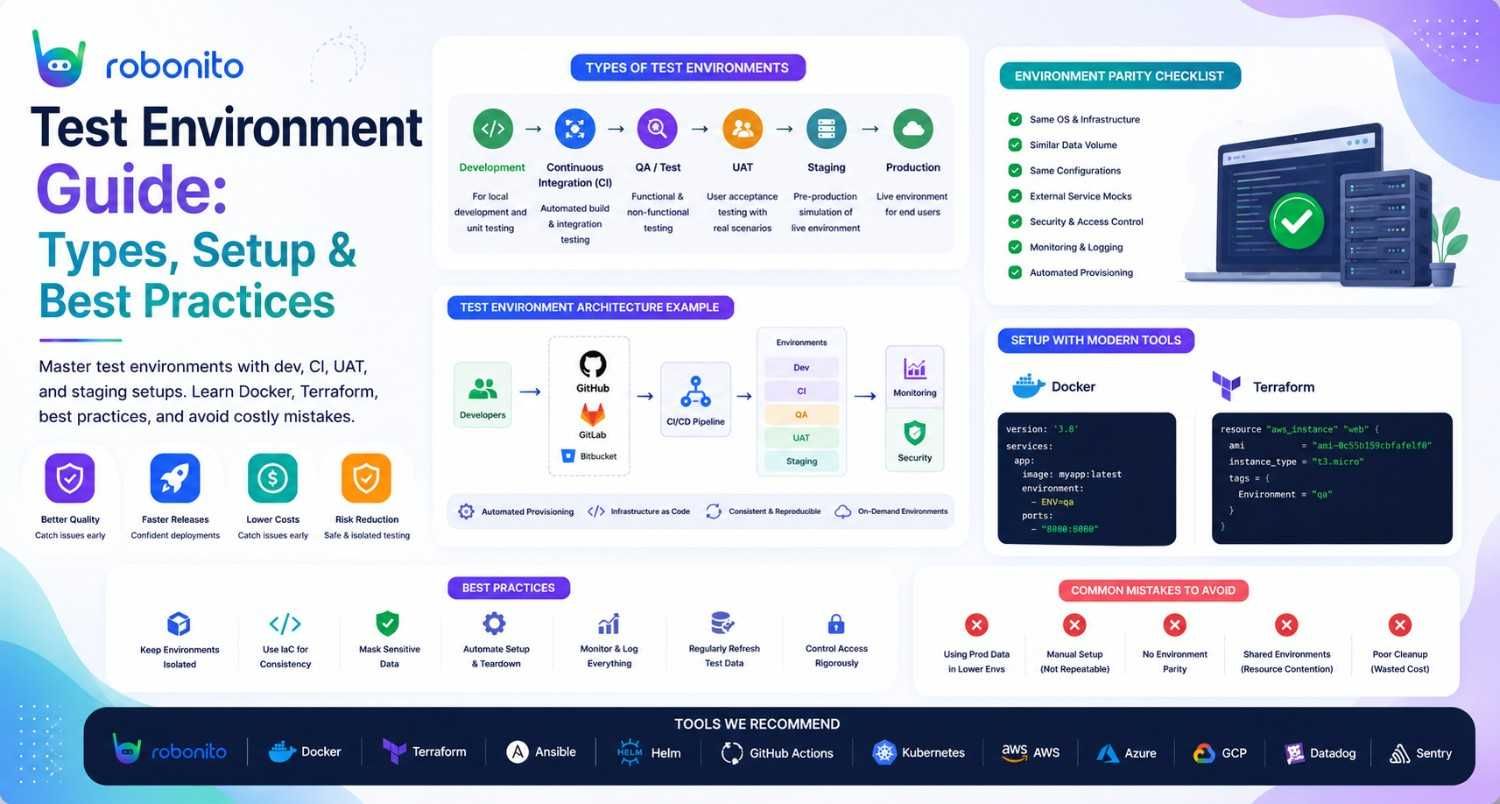
The most common cause of "it worked in testing" failures is not bad tests — it is a test environment that did not accurately reflect production. This guide covers every type of test environment, how to set each one up correctly, and the management practices that keep them reliable.
By Robonito Engineering Team · Updated May 2026 · 17 min read
Quick stats
| Fact | Source |
|---|---|
| 85% of production incidents could have been caught by better pre-production testing | Gartner |
| Environment configuration errors account for 22% of deployment failures | PagerDuty State of Digital Operations 2025 |
| Teams using ephemeral environments reduce environment-related test failures by up to 60% | DORA State of DevOps 2025 |
| Shared test environments cause 3× more test flakiness than isolated environments | ThoughtWorks Technology Radar 2025 |
| Infrastructure-as-code reduces environment provisioning time by up to 80% | HashiCorp State of Cloud 2025 |
Table of Contents
- What is a test environment?
- All seven types of test environments explained
- The modern addition: ephemeral environments
- How to set up a test environment — with real configuration
- Test data management strategy
- Environment management best practices
- Secrets and credentials management
- Test environments in CI/CD pipelines
- Common test environment mistakes
- Pre-release environment checklist
- Frequently Asked Questions
Run your tests across every environment automatically
Robonito connects to your staging, CI, and UAT environments out of the box — running automated regression tests on every deployment without any environment-specific configuration. Try Robonito free →
1. What is a test environment?
One-sentence definition for featured snippets: A test environment is a controlled, isolated infrastructure setup — including servers, databases, network configuration, and test data — where software is validated before deployment to production.
When a user reports that "the checkout broke after Friday's release," the investigation almost always reaches the same root cause: the test environment used before that release was missing something the production environment had. A different database version. A missing environment variable. A third-party API integration pointed at a sandbox when production points at live. Real user data with edge cases that synthetic test data never captured.
This is why test environment quality is a direct prerequisite for testing quality. The most thorough test suite in the world produces unreliable results if it runs against an environment that does not accurately reflect production. Garbage in, garbage out — but at the infrastructure level.
A well-designed test environment answers three questions correctly:
Does it mirror production? Not perfectly — production parity is expensive and unnecessary for all environments — but close enough that a passing test predicts production behaviour.
Is it isolated? Tests that run against a shared environment pollute each other. One developer's feature test changes state that breaks another developer's test. Isolated environments make test results trustworthy.
Is it reproducible? An environment that was manually configured over months, with changes nobody documented, cannot be recreated when it fails. Environments defined as code can be rebuilt in minutes.
2. All seven types of test environments explained

Modern software teams use multiple environments, each serving a distinct purpose at a different stage of the development lifecycle.
2.1 Local development environment
Purpose: Individual developers build and test features before sharing with the team.
Characteristics: Runs entirely on the developer's machine. Maximum flexibility — developers can make rapid changes without affecting anyone else. Typically uses lightweight local alternatives to production services: SQLite instead of PostgreSQL, a mock email server instead of SendGrid, a local Docker Compose setup instead of the full cloud infrastructure.
Key limitation: Local environments diverge from production over time as developers install different versions of dependencies, configure things differently, and accumulate local-only state. "Works on my machine" is a symptom of a local environment that has drifted from the shared baseline.
Solution: Docker Compose for local environment standardisation — see Section 4.
2.2 Integration / CI environment
Purpose: Automated testing that runs on every commit and pull request.
Characteristics: Runs in the CI/CD pipeline (GitHub Actions, GitLab CI, Jenkins). Ephemeral — created fresh for each run, destroyed when complete. Uses lightweight service containers (PostgreSQL in a Docker container, Redis in a Docker container) rather than persistent shared infrastructure.
Key requirement: Must start from a clean, known state every run. Test results from a CI environment that carries state between runs are unreliable and progressively harder to trust.
2.3 Testing / QA environment
Purpose: Dedicated validation by QA engineers — functional testing, regression testing, exploratory testing.
Characteristics: Persistent (not recreated for each test run). Shared by the QA team. More closely mirrors production than local or CI environments. Typically connected to sandboxes of third-party services (payment processor sandbox, email service sandbox).
Key management challenge: Shared QA environments accumulate data and state over time, creating test interference. Regular resets and careful test data management are essential.
2.4 Staging environment
Purpose: Final pre-production validation — the last gate before deploying to production.
Characteristics: The closest replica of production in the entire environment chain. Same infrastructure type (same cloud provider, same instance sizes), same database engine and version, same third-party integrations (pointed at sandbox equivalents where possible), same deployment process.
The golden rule for staging: Deploy to staging using exactly the same deployment pipeline and process as production. If your production deploy uses a Kubernetes rolling update, staging should too. If production requires a database migration, staging runs it first. Any discrepancy between staging and production is a risk.
Key limitation: Cost. A full production-parity staging environment for a complex application can be expensive to maintain. Teams manage this by running staging at reduced scale (fewer replicas) but identical configuration.
2.5 UAT (User Acceptance Testing) environment
Purpose: End-user or client representative validation against acceptance criteria.
Characteristics: Separate from the QA environment to give business stakeholders a clean, stable space that QA activity does not disrupt. Uses realistic (but anonymised or synthetic) test data that reflects real-world scenarios. Typically locked down — no code changes during active UAT sessions.
Common mistake: Running UAT against the QA environment. When QA continues testing while business users are doing UAT, the environment state changes beneath them, creating false failures and a confusing testing experience.
2.6 Performance testing environment
Purpose: Load testing, stress testing, soak testing — validating performance under realistic traffic volumes.
Characteristics: Must mirror production at the infrastructure level — same instance types, same database configuration, same caching layer. Running load tests against an under-resourced environment produces misleading results. Uses anonymised copies of production data (or carefully constructed synthetic data) at realistic volume.
Critical requirement: The performance environment must be isolated from all other testing. A load test that generates 500 concurrent users sharing an environment with functional tests will corrupt both sets of results.
2.7 Production environment
Purpose: Serving real users with real data.
Characteristics: Not a test environment — included here for completeness because understanding what production is helps clarify what pre-production environments are trying to replicate.
Testing in production: Synthetic monitoring (scripted checks running against production on a schedule) is the appropriate form of production "testing." It verifies that critical user flows work without the risk of load tests or data mutations affecting real users.
Environment comparison matrix
| Environment | Persistence | Who uses it | Mirrors production | Test data | Cost |
|---|---|---|---|---|---|
| Local dev | Persistent | Individual developer | Loosely | Developer-managed | Low |
| CI/CD | Ephemeral | Automated pipeline | Moderately | Seeded per run | Low |
| QA/Testing | Persistent | QA team | Closely | Managed test data | Medium |
| Staging | Persistent | QA + release | Very closely | Anonymised copy | Medium-High |
| UAT | Persistent (UAT window) | Business users | Closely | Realistic synthetic | Medium |
| Performance | On-demand | Performance team | Exactly | Production-volume synthetic | High |
| Production | Always on | Real users | N/A — IS production | Real | Varies |
3. The modern addition: ephemeral environments
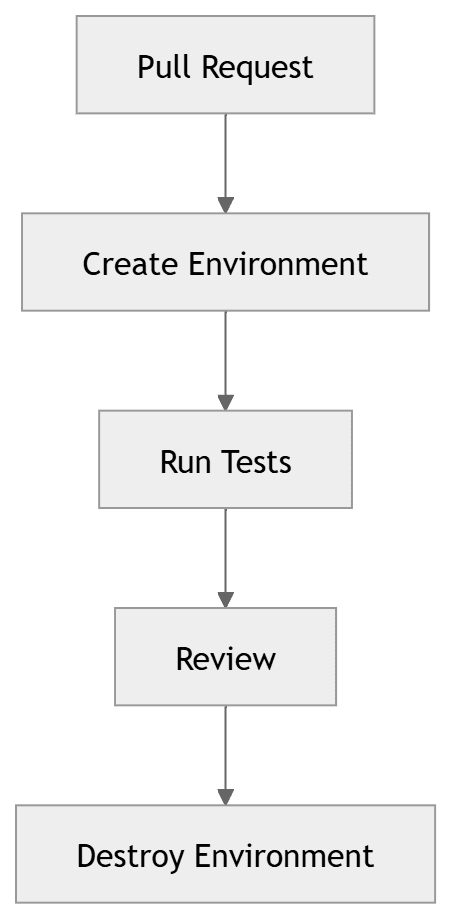
Ephemeral environments are the most significant evolution in test environment strategy over the past five years. Where traditional environments are persistent and shared, ephemeral environments are temporary and isolated — spun up on demand for a specific purpose and destroyed when that purpose is complete.
Why ephemeral environments solve shared environment problems
Shared test environments have a fundamental problem: they accumulate state. Developer A tests a feature that creates database records. Developer B's tests fail because the data Developer A created changed the expected state. The QA environment is reset every Monday, but it is Tuesday and the accumulated state from 12 different feature branches has made the environment unreliable.
Ephemeral environments solve this by giving every test run (or every pull request) its own isolated environment, starting from a known clean state. No state accumulates because the environment is destroyed after use.
Creating ephemeral environments with Docker Compose
## docker-compose.test.yml — ephemeral test environment
## Run: docker compose -f docker-compose.test.yml up -d
## Destroy: docker compose -f docker-compose.test.yml down -v

version: '3.9'

services:
  app:
    build:
      context: .
      target: test  ## Multi-stage build — test stage
    environment:
      NODE_ENV: test
      DATABASE_URL: postgresql://testuser:testpass@postgres:5432/testdb
      REDIS_URL: redis://redis:6379
      SMTP_HOST: mailhog  ## Local mail catcher — no real emails sent
      PAYMENT_API_URL: http://payment-mock:3001  ## Mock payment service
      APP_SECRET_KEY: test-secret-key-never-use-in-production
    ports:
      - "3000:3000"
    depends_on:
      postgres:
        condition: service_healthy
      redis:
        condition: service_healthy
    command: ["npm", "run", "start:test"]

  postgres:
    image: postgres:16-alpine
    environment:
      POSTGRES_DB: testdb
      POSTGRES_USER: testuser
      POSTGRES_PASSWORD: testpass
    volumes:
      - ./db/seed.sql:/docker-entrypoint-initdb.d/seed.sql  ## Seed on start
    healthcheck:
      test: ["CMD-SHELL", "pg_isready -U testuser -d testdb"]
      interval: 5s
      timeout: 5s
      retries: 5
    ## No volume mount for data — ephemeral by design
    ## Container destroyed = all data gone

  redis:
    image: redis:7-alpine
    healthcheck:
      test: ["CMD", "redis-cli", "ping"]
      interval: 5s
      retries: 5

  mailhog:
    image: mailhog/mailhog:latest
    ## Captures all outbound email — viewable at http://localhost:8025
    ports:
      - "8025:8025"

  payment-mock:
    image: yourregistry/payment-mock:latest
    ## Mock payment service — returns configurable success/failure responses
    ports:
      - "3001:3001"
## Makefile — standard commands for environment lifecycle
.PHONY: test-env-up test-env-down test-run

test-env-up:
	docker compose -f docker-compose.test.yml up -d --wait
	@echo "Test environment ready at http://localhost:3000"

test-env-down:
	docker compose -f docker-compose.test.yml down -v --remove-orphans
	@echo "Test environment destroyed — all data cleared"

test-run: test-env-up
	npm run test:integration
	$(MAKE) test-env-down
PR-level ephemeral environments with GitHub Actions
## .github/workflows/pr-environment.yml
name: PR Ephemeral Environment

on:
  pull_request:
    types: [opened, synchronize]

jobs:
  deploy-pr-environment:
    runs-on: ubuntu-latest
    steps:
      - uses: actions/checkout@v4

      - name: Deploy PR environment
        run: |
          ## Deploy to Railway/Render/Vercel with PR-specific subdomain
          ## e.g., pr-123.staging.yourapp.com
          railway up \
            --environment "pr-${{ github.event.number }}" \
            --service web-app

      - name: Run tests against PR environment
        run: npx playwright test tests/
        env:
          BASE_URL: "https://pr-${{ github.event.number }}.staging.yourapp.com"

      - name: Post environment URL to PR
        uses: actions/github-script@v7
        with:
          script: |
            github.rest.issues.createComment({
              issue_number: context.issue.number,
              owner: context.repo.owner,
              repo: context.repo.repo,
              body: '**PR Environment deployed:** https://pr-${{ github.event.number }}.staging.yourapp.com'
            })

  cleanup-pr-environment:
    runs-on: ubuntu-latest
    if: github.event.action == 'closed'
    steps:
      - name: Destroy PR environment
        run: railway down --environment "pr-${{ github.event.number }}"
4. How to set up a test environment — with real configuration
Step 1: Define environment parity requirements
Before configuring anything, answer: what does this environment need to match about production? For a staging environment: same database engine and version, same cache configuration, same authentication service, same infrastructure type. For a CI environment: same application code, same database schema, same core dependencies.
Document the parity requirements explicitly. Environment drift — where the environment gradually diverges from production — happens silently when nobody tracks what should be in sync.
Step 2: Standardise with Infrastructure-as-Code
Manually configured environments are single points of failure. When they break, they are hard to rebuild. When they drift, nobody knows what changed. Infrastructure-as-code makes every configuration decision version-controlled, reviewable, and reproducible.
## terraform/environments/staging/main.tf
## Staging environment — mirrors production at reduced scale

module "staging_app" {
  source = "../../modules/web-app"

  environment     = "staging"
  instance_type   = "t3.small"      ## Smaller than production (t3.large)
  replica_count   = 1               ## Single replica vs production's 3
  database_size   = "db.t3.micro"  ## Smaller RDS instance

  ## Critical: same configuration as production, different scale
  app_version     = var.app_version
  database_engine = "postgres"
  database_version = "16.1"        ## Must match production exactly
  redis_version   = "7.2"          ## Must match production exactly

  ## Environment-specific overrides
  domain          = "staging.yourapp.com"
  log_level       = "debug"        ## More verbose than production
  feature_flags   = {
    enable_new_checkout = true    ## Test unreleased features in staging
  }

  tags = {
    Environment = "staging"
    ManagedBy   = "terraform"
    AutoShutdown = "true"         ## Staging can be shut down overnight
  }
}
Step 3: Automate environment provisioning in CI
## .github/workflows/deploy-staging.yml
name: Deploy to Staging

on:
  push:
    branches: [main]

jobs:
  deploy-staging:
    runs-on: ubuntu-latest
    environment: staging
    steps:
      - uses: actions/checkout@v4

      - name: Set up Terraform
        uses: hashicorp/setup-terraform@v3
        with:
          terraform_version: '1.7.0'

      - name: Terraform init
        run: terraform init
        working-directory: terraform/environments/staging
        env:
          AWS_ACCESS_KEY_ID: ${{ secrets.AWS_ACCESS_KEY_ID }}
          AWS_SECRET_ACCESS_KEY: ${{ secrets.AWS_SECRET_ACCESS_KEY }}

      - name: Terraform apply — update staging environment
        run: |
          terraform apply -auto-approve \
            -var="app_version=${{ github.sha }}"
        working-directory: terraform/environments/staging

      - name: Wait for deployment health check
        run: |
          for i in {1..30}; do
            if curl -sf https://staging.yourapp.com/health; then
              echo "Staging environment healthy"
              exit 0
            fi
            echo "Waiting... attempt $i/30"
            sleep 10
          done
          echo "Staging environment failed to become healthy"
          exit 1

      - name: Run smoke tests against staging
        uses: robonito/run-tests-action@v2
        with:
          api-key: ${{ secrets.ROBONITO_API_KEY }}
          suite: smoke
          environment: staging
          fail-on: any
Step 4: Seed test data automatically
-- db/seed.sql — automatically run on container start
-- Provides consistent, known test data for every test run

-- Test user accounts (different roles for permission testing)
INSERT INTO users (id, email, name, role, created_at) VALUES
  ('test-admin-001', 'admin@test.example.com', 'Test Admin', 'admin', NOW()),
  ('test-user-001', 'user@test.example.com', 'Test User', 'user', NOW()),
  ('test-viewer-001', 'viewer@test.example.com', 'Test Viewer', 'viewer', NOW())
ON CONFLICT (email) DO NOTHING;

-- Test products for e-commerce scenarios
INSERT INTO products (id, name, price, stock, status) VALUES
  ('prod-in-stock', 'Widget Pro (In Stock)', 49.99, 100, 'active'),
  ('prod-low-stock', 'Widget Basic (Low Stock)', 19.99, 2, 'active'),
  ('prod-out-of-stock', 'Widget Elite (Out of Stock)', 99.99, 0, 'active'),
  ('prod-inactive', 'Widget Legacy (Inactive)', 29.99, 50, 'inactive')
ON CONFLICT (id) DO NOTHING;
5. Test data management strategy
Test data is the most neglected aspect of test environment management and the most common cause of unreliable test results.
The three approaches to test data
Static seed data — a fixed dataset seeded on environment creation. Every test run starts from the same known state. Simple to implement, reliable, but requires careful management as the schema evolves.
Dynamic test data generation — each test creates its own data during setup and cleans it up during teardown. Maximally isolated — tests cannot interfere with each other. More complex to implement but produces the most reliable results.
Production data copy (anonymised) — a copy of real production data with all PII anonymised or replaced with synthetic values. Reflects real-world data distribution and edge cases that synthetic data misses. Never use unmodified production data in any test environment — this violates GDPR and most data protection regulations.
Test data lifecycle management
## conftest.py — pytest test data lifecycle management
import pytest
from database import db

@pytest.fixture(scope="function")
def test_user():
    """Create a fresh test user for each test, clean up after."""
    import uuid
    user = db.create_user(
        email=f"test+{uuid.uuid4().hex[:8]}@example.com",
        name="Test User",
        role="user"
    )
    yield user
    ## Teardown: always delete test data after the test
    db.delete_user(user["id"])

@pytest.fixture(scope="function")
def test_order(test_user):
    """Create a test order owned by the test user."""
    order = db.create_order(
        user_id=test_user["id"],
        product_id="prod-in-stock",
        quantity=2
    )
    yield order
    ## Cleanup handled by test_user fixture cascade delete
What NOT to do with test data
- Never use real customer email addresses in test data — they receive test emails
- Never copy production passwords — they are real credentials
- Never use real payment card numbers — even in test environments
- Never leave test data in staging after a test run — it accumulates and causes unexpected failures
6. Environment management best practices
Define environments as code — always
Every test environment should be fully defined in version-controlled infrastructure code. If an environment requires manual steps to set up or cannot be rebuilt from the code repository alone, it is a liability. Version-controlled environments are reproducible, auditable, and recoverable.
Establish environment promotion gates
Code moves through environments in one direction: development → CI → QA → staging → production. Never skip a gate. Never deploy directly from development to production. The gate discipline is what makes each environment's test results meaningful.
Local dev → [unit tests pass]
    │
    ▼
CI environment → [integration tests pass]
    │
    ▼
QA environment → [functional tests + exploratory testing pass]
    │
    ▼
Staging → [regression + performance + security pass]
    │
    ▼
UAT → [business sign-off]
    │
    ▼
Production → [smoke tests pass post-deploy]
Protect the staging environment
Staging is the last gate before production. Treat it accordingly:
- Require approval to deploy to staging (not open to every commit)
- No direct database modifications in staging — only migrations via deployment
- Reset staging data on a regular schedule to prevent drift from accumulation
- Never use staging as a development environment — it is a production mirror, not a sandbox
Monitor all pre-production environments
Environment failures — a database running out of disk, a service container restarting repeatedly, a certificate expiring — are silent unless you are looking for them. Basic health monitoring on all shared environments (QA, staging, UAT) catches these problems before they corrupt a day of testing.
7. Secrets and credentials management
Secrets management is the most commonly mishandled aspect of test environment setup, and the one with the most serious security consequences.
What counts as a secret in a test environment
- Database passwords and connection strings
- API keys for third-party services (even sandbox keys)
- JWT signing secrets and encryption keys
- Service account credentials
- OAuth client secrets
The three rules
Rule 1: Never hardcode secrets in configuration files.
A configuration file with a hardcoded database password is one accidental git push away from being in a public repository.
Rule 2: Never commit secrets to version control.
Use .gitignore to exclude .env files. Use pre-commit hooks to scan for accidental secret commits. Tools like git-secrets (AWS) or gitleaks detect and block secret commits automatically.
Rule 3: Use different secrets for every environment. Test environment secrets must be completely separate from production secrets. If a test environment is compromised (or if a developer accidentally logs credentials), it must not expose production access.
## GitHub Actions — correct secrets management for test environments
jobs:
  test:
    runs-on: ubuntu-latest
    steps:
      - name: Run tests with injected secrets
        run: npm run test:integration
        env:
          ## Secrets injected from GitHub Secrets — never in the YAML file
          DATABASE_URL: ${{ secrets.TEST_DATABASE_URL }}
          PAYMENT_API_KEY: ${{ secrets.TEST_PAYMENT_API_KEY }}
          JWT_SECRET: ${{ secrets.TEST_JWT_SECRET }}
          ## These are TEST-specific credentials in the GitHub Secrets store
          ## Production credentials are in a separate secrets store with different access
8. Test environments in CI/CD pipelines

Every stage of a CI/CD pipeline needs a corresponding environment. The quality of your pipeline is only as good as the isolation and fidelity of the environments each stage runs against.
## .github/workflows/full-pipeline.yml
name: Full Test Pipeline

on:
  push:
    branches: [main, develop]
  pull_request:

jobs:
  ## Stage 1: CI environment (ephemeral, per-run)
  unit-and-integration:
    name: Unit + Integration (CI environment)
    runs-on: ubuntu-latest
    services:
      postgres:
        image: postgres:16
        env:
          POSTGRES_DB: testdb
          POSTGRES_USER: testuser
          POSTGRES_PASSWORD: testpass
        options: >-
          --health-cmd pg_isready
          --health-interval 10s
      redis:
        image: redis:7
        options: --health-cmd "redis-cli ping"
    steps:
      - uses: actions/checkout@v4
      - uses: actions/setup-node@v4
        with: { node-version: '20', cache: 'npm' }
      - run: npm ci
      - run: npm run db:migrate:test
      - run: npm run db:seed:test
      - run: npm test
        env:
          DATABASE_URL: postgresql://testuser:testpass@localhost:5432/testdb
          REDIS_URL: redis://localhost:6379
          NODE_ENV: test

  ## Stage 2: QA environment (persistent shared)
  functional-tests:
    name: Functional Tests (QA environment)
    runs-on: ubuntu-latest
    needs: unit-and-integration
    if: github.ref == 'refs/heads/main'
    steps:
      - uses: actions/checkout@v4
      - uses: actions/setup-node@v4
        with: { node-version: '20', cache: 'npm' }
      - run: npm ci
      - run: npx playwright install --with-deps chromium webkit
      - run: npx playwright test tests/functional/
        env:
          BASE_URL: ${{ secrets.QA_ENVIRONMENT_URL }}
          TEST_USER_EMAIL: ${{ secrets.QA_TEST_USER_EMAIL }}
          TEST_USER_PASSWORD: ${{ secrets.QA_TEST_USER_PASSWORD }}

  ## Stage 3: Staging environment (production mirror)
  staging-regression:
    name: Regression Tests (Staging environment)
    runs-on: ubuntu-latest
    needs: functional-tests
    environment: staging
    steps:
      - uses: actions/checkout@v4
      - name: Deploy to staging
        run: ./scripts/deploy-staging.sh ${{ github.sha }}

      - name: Run Robonito regression suite
        uses: robonito/run-tests-action@v2
        with:
          api-key: ${{ secrets.ROBONITO_API_KEY }}
          suite: regression
          environment: staging
          fail-on: critical

      - name: Run security scan
        uses: zaproxy/action-full-scan@v0.10.0
        with:
          target: ${{ secrets.STAGING_URL }}
          fail_action: true
9. Common test environment mistakes
Mistake 1: Treating all environments as permanent
Most teams create test environments, configure them manually over months, and then treat them as precious infrastructure that cannot be recreated. When they fail, recovery is slow and painful. When they drift from production, nobody notices.
Design environments to be disposable from day one. If you cannot rebuild your QA environment from version-controlled configuration in under 30 minutes, it will eventually become a problem.
Mistake 2: Sharing test environments across teams without isolation
A shared QA environment where multiple teams are testing simultaneously is a reliability disaster. Team A's feature deploys corrupt the state that Team B's tests depend on. Test results become untrustworthy and the environment gets blamed rather than the process.
Use branch-specific or PR-specific ephemeral environments for parallel development. Reserve shared persistent environments for QA phases that require stable, pre-deployed builds.
Mistake 3: Environment variables differ between staging and production
The most common source of "it worked in staging" failures. A missing environment variable, a different feature flag default, a pointing to a sandbox API when production points to live — any discrepancy between staging and production configuration is a risk.
Maintain an explicit inventory of every environment variable in production and verify that staging has the equivalent configured. Infrastructure-as-code with environment-specific variable files makes this comparison straightforward.
Mistake 4: Using real production data in test environments
Real production data in test environments violates GDPR, CCPA, HIPAA, and most data protection regulations. It also creates operational risks — sending real emails to real customers, processing real charges, deleting real records. Always anonymise or synthesise test data. Never take a production database dump and restore it directly to a test environment without data masking.
Mistake 5: No monitoring on non-production environments
A QA environment that has been silently running out of disk space for three days — and nobody noticed because nobody monitors it — explains why the test results from the last three days are unreliable. Apply basic health monitoring (disk space, service availability, certificate expiry) to all shared environments.
10. Pre-release environment checklist
Environment configuration
- All environments defined as code (Terraform, Docker Compose, Kubernetes manifests)
- Staging mirrors production configuration (same DB engine/version, same cache, same infrastructure type)
- No hardcoded secrets in any configuration file or version-controlled code
- All environment variables documented and verified present in staging
- Test data seeded from version-controlled seed scripts — no manual data insertion
- Staging database schema matches production exactly (migrations applied in order)
Isolation and access
- Staging, QA, and UAT environments are isolated from each other
- Staging environment access restricted to release pipeline + QA team
- No production credentials used in any test environment
- Test environment email configuration routes to mail catcher (no real emails sent)
- Payment integrations point to sandbox — not live payment processor
CI/CD pipeline
- CI environment created fresh per run (no state from previous runs)
- All pipeline secrets injected via secret manager (GitHub Secrets, Vault)
- Deployment to staging uses same process as deployment to production
- Post-deploy smoke tests configured to run automatically after each staging deploy
- Rollback procedure tested and documented
Monitoring and maintenance
- Health monitoring active on all shared environments
- Disk space alerts configured (alert at 80% capacity)
- SSL certificate expiry alerts configured (alert 30 days before expiry)
- Staging environment reset schedule defined (weekly or bi-weekly data reset)
- Environment drift detection: periodic comparison of staging vs production config
Frequently Asked Questions
What is a test environment?
A test environment is a controlled, isolated infrastructure setup — including servers, databases, network configuration, and test data — where software is validated before deployment to production. It replicates production conditions closely enough that test results predict real-world behaviour, while remaining isolated so testing cannot affect live users or real data.
What is the difference between a staging environment and a production environment?
Staging mirrors production architecture and configuration but uses anonymised test data and is not accessible to real users. It is the final pre-production gate where software is validated before going live. Production serves real users with real data. The key rule is that no code should go directly from development to production — staging is the mandatory intermediate step.
What are the types of test environments?
The seven main types are: local development, CI/CD (ephemeral, per-run), QA/testing (persistent QA team environment), staging (pre-production mirror), UAT (user acceptance), performance testing (load/stress testing), and production. Modern teams also use ephemeral environments per pull request — temporary isolated environments created and destroyed automatically.
What is an ephemeral test environment?
An ephemeral environment is created automatically for a specific purpose (a pull request, a test run) and destroyed when complete. Tools like Docker Compose, Kubernetes, and deployment platforms like Railway create ephemeral environments in minutes. They eliminate shared environment conflicts by giving every test run its own clean, isolated space.
How should secrets be managed in test environments?
Never hardcode secrets in configuration files or check them into version control. Inject secrets at runtime via environment variables from a secrets manager (GitHub Actions Secrets, AWS Secrets Manager, HashiCorp Vault). Use test-specific credentials completely separate from production credentials.
Why do test environments drift from production — and how do you prevent it?
Drift happens when environments are manually configured and changes are not tracked. A developer adds a dependency, changes a configuration value, or installs a different software version without updating the environment definition. Prevention requires Infrastructure-as-Code: every environment is defined in version-controlled configuration that can be rebuilt from scratch. Drift becomes visible in code reviews and is fixed before it creates test reliability problems.
External references
- Terraform Documentation — Infrastructure-as-code for environments
- GitHub Actions Secrets — Secrets management in CI
- OWASP Data Protection Cheatsheet — Test data management guidance
Run automated tests across every environment — staging, CI, UAT — without configuration
Robonito connects to any web-based test environment in minutes, runs your full regression suite after every deploy, and alerts your team the moment a critical flow breaks — no environment-specific scripts to maintain. Start free at Robonito.com →
Automate your QA — no code required
Stop writing test scripts.
Start shipping with confidence.
Join thousands of QA teams using Robonito to automate testing in minutes — not months.