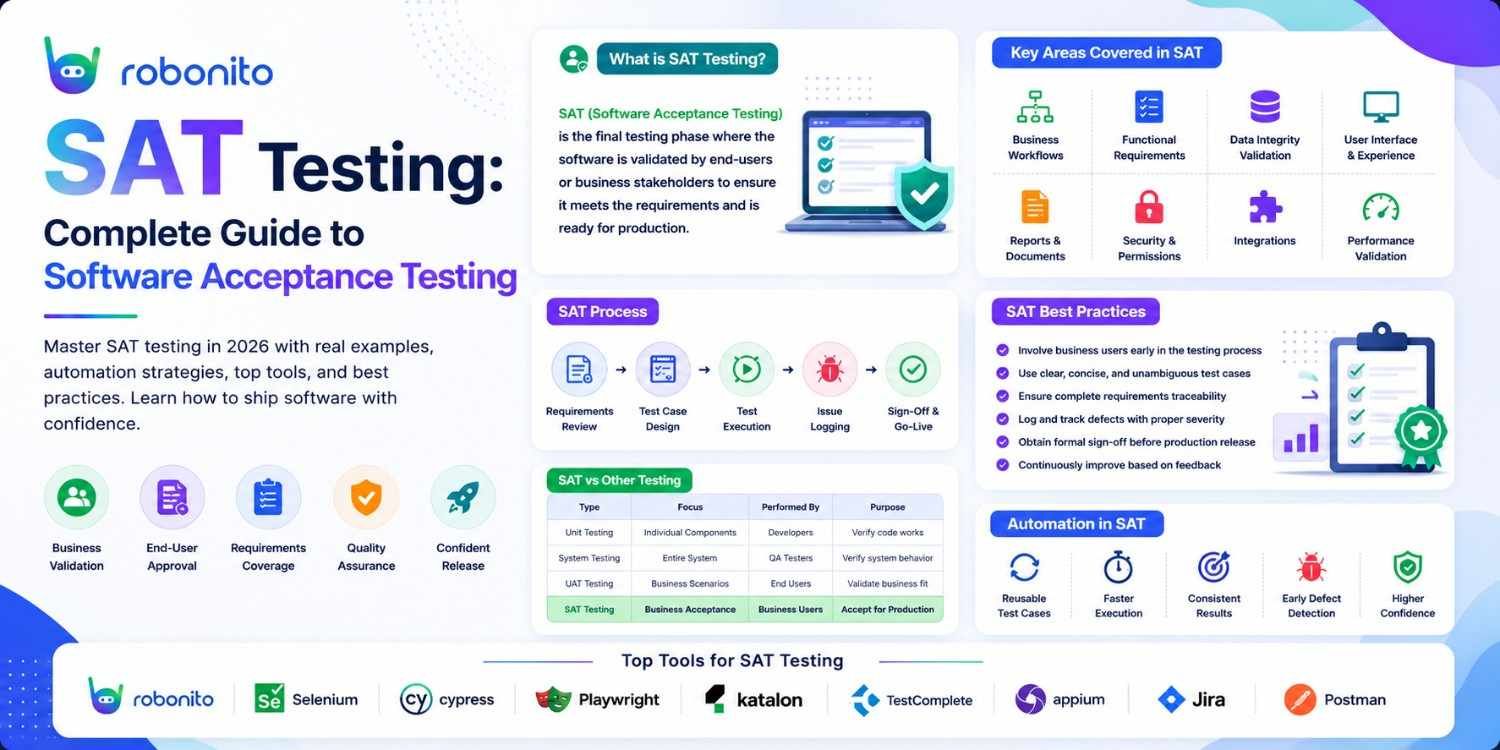
Most software defects that reach production were not caught because tests were not thorough enough — they were caught because acceptance criteria were never clearly defined in the first place. SAT testing fixes that. This guide covers what it is, how it works, how to write it, automate it, and use it to ship with genuine confidence.
By Robonito Engineering Team · Updated May 2026 · 17 min read
Quick stats
| Fact | Source |
|---|---|
| 40–50% of software defects originate from poorly defined requirements | IBM Systems Sciences Institute |
| A defect found during acceptance testing costs 10× more to fix than in unit testing | IBM Research |
| Teams that define acceptance criteria before development reduce rework by up to 40% | PMI Pulse of the Profession 2024 |
| 67% of software projects fail to meet user expectations at first release | Standish Group CHAOS Report 2025 |
| Automated acceptance testing reduces regression detection time by 85× | DORA State of DevOps 2025 |
Table of Contents
- What is SAT testing?
- SAT testing vs UAT vs other testing types
- Types of software acceptance testing
- How to write acceptance criteria that actually work
- SAT testing techniques — black box, white box, grey box
- Real acceptance test examples with code
- Automating SAT testing
- SAT testing tools compared
- Common SAT testing mistakes and how to avoid them
- SAT testing in CI/CD pipelines
- Pre-release SAT testing checklist
- Frequently Asked Questions
Automate your acceptance tests without writing a single script
Robonito generates acceptance test cases from your real user flows, runs them as deployment gates in CI, and self-heals when your UI changes — no code required. Try Robonito free →
1. What is SAT testing?
One-sentence definition for featured snippets: SAT testing (Software Acceptance Testing) is the final validation phase where software is evaluated against predefined acceptance criteria to confirm it meets business requirements and is ready for production deployment.
Think about what typically goes wrong at the end of a software project. The developers say the feature is done — all their unit tests pass, the code review is approved, and it works on their machines. The client reviews it and says it is not what they asked for. Two weeks of rework follow, the release is delayed, and nobody is certain exactly where the misalignment happened.
This scenario is not a development failure. It is an acceptance criteria failure. The team never had a shared, written, testable definition of what "done" meant for that feature. SAT testing fixes this at the source — by making "done" explicit, objective, and verifiable before a single line of code is written.
SAT testing evaluates the complete software system against a set of predefined acceptance criteria — the written conditions that must be true for the software to be considered acceptable by the customer, end-user, or stakeholder who commissioned it. It is the bridge between what was requested and what was delivered. When it is done well, it makes that gap visible and fixable before production. When it is skipped or done poorly, users discover the gap instead.
Where SAT testing sits in the development lifecycle
Requirements
     │
     ▼
Design & Development
     │
     ▼
Unit Testing          ← Individual functions tested by developers
     │
     ▼
Integration Testing   ← Components tested together
     │
     ▼
System Testing        ← Full system tested by QA
     │
     ▼
SAT Testing  ◄────── You are here: final gate before production
     │
     ▼
Production Deployment

SAT testing is the last line of defence before users. Every other testing phase catches technical bugs — broken functions, failed integrations, performance regressions. SAT testing catches the gap between technical correctness and business correctness: the software works, but does it do what the business actually needed?
2. SAT testing vs UAT vs other testing types
The terminology around acceptance testing is frequently misused. Here is the clean distinction:
| Testing type | Who runs it | What it validates | When it runs |
|---|---|---|---|
| Unit testing | Developers | Individual functions in isolation | Every commit |
| Integration testing | Developers / QA | Components working together | Every PR |
| System testing | QA team | Full system functionality | Before acceptance |
| SAT testing | QA / client reps / end-users | Software vs acceptance criteria | Before production |
| UAT (User Acceptance Testing) | Actual end-users | Real-world business workflows | Subset of SAT |
| Alpha testing | Internal users | Overall product usability | Pre-beta |
| Beta testing | External pilot users | Real-world conditions at scale | Pre-launch |
| Regulatory testing | Compliance teams | Legal and regulatory requirements | Before certification |
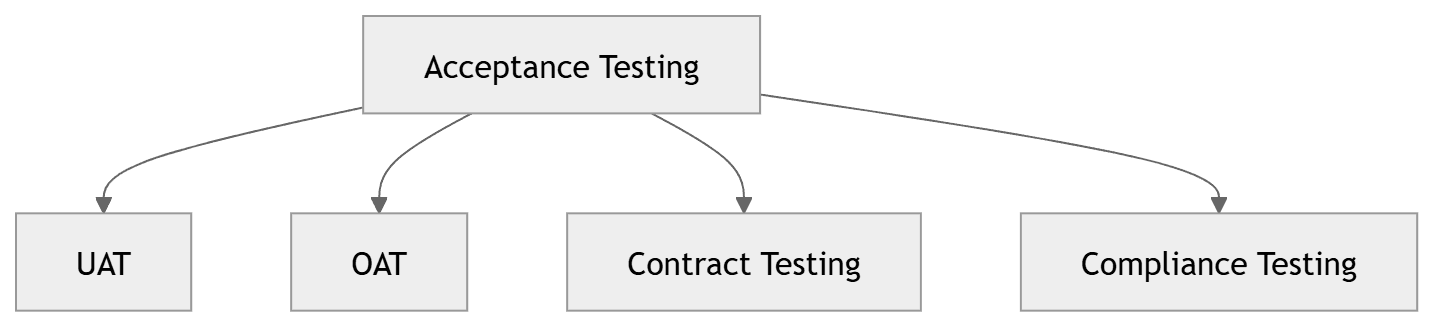
The key relationship: UAT is the most common form of SAT testing, but it is a subset — not the whole. SAT testing also includes contract acceptance testing (does the software meet contractual obligations?), operational acceptance testing (can the operations team support and maintain it?), and regulatory compliance testing (does it meet legal requirements?).
When most teams say "we need to do acceptance testing," they mean UAT — getting real users or client representatives to validate the software before release. This guide covers the full SAT spectrum but gives particular attention to UAT because it is where most teams struggle most.
3. Types of software acceptance testing
3.1 User Acceptance Testing (UAT)
What it validates: Does the software support the real-world workflows of the people who will use it daily?
UAT is conducted by actual end-users or client representatives — not QA engineers, not developers. These testers bring domain knowledge that no technical team member possesses: they know how the business process actually works, what edge cases appear in real usage, and whether the software feels right for how they need to work.
UAT is the most powerful form of acceptance testing precisely because it brings this outside perspective. A developer who built a feature can demonstrate that it works correctly. An end-user testing the same feature will use it in ways the developer never anticipated — and surface the gaps that no other testing phase catches.
When it works best: UAT with real users early and often — not a single late-stage review. Teams that involve end-users in iterative UAT cycles throughout development find and fix misalignments when they are cheap to correct rather than after full implementation.
3.2 Operational Acceptance Testing (OAT)
What it validates: Can the operations team successfully deploy, maintain, monitor, and support this software?
OAT is the most commonly skipped type of acceptance testing — and the one that causes the most post-launch operational crises. Even software that works perfectly from a functional standpoint can fail operationally if backup procedures are not tested, monitoring is not configured, rollback procedures do not work, or the on-call runbook does not accurately describe what to do when something goes wrong.
OAT specifically tests: deployment and rollback procedures, backup and recovery processes, monitoring and alerting configuration, log accessibility, performance under maintenance load, and the accuracy of operational documentation.
3.3 Contract Acceptance Testing
What it validates: Does the delivered software meet every clause and deliverable defined in the contract or statement of work?
Contract acceptance testing maps every contractual requirement to a corresponding test case and verifies each one passes. It is particularly important in outsourced development, government contracts, and any engagement where the software handover triggers payment milestones. The test results become the formal evidence that contracted deliverables were met.
3.4 Regulatory / Compliance Acceptance Testing
What it validates: Does the software meet all applicable legal, industry, and regulatory requirements?
Healthcare software must meet HIPAA requirements. Financial software must comply with SOX and PCI-DSS. Software handling EU user data must comply with GDPR. Accessibility requirements under WCAG 2.2 and the ADA apply to public-facing software in most jurisdictions. Regulatory acceptance testing verifies these requirements are met before the software can legally operate.
3.5 Alpha and Beta Testing
Alpha testing is conducted by internal users — employees of the development organisation — in a controlled environment before external release. It catches usability and functional issues that passed through earlier testing phases.
Beta testing expands to a limited group of real external users under real-world conditions. Beta testing uncovers the long-tail of bugs and usability issues that only emerge at scale and in diverse real-world environments — issues that no internal testing environment, however well designed, fully replicates.
4. How to write acceptance criteria that actually work
The quality of your SAT testing is only as good as the quality of your acceptance criteria. Vague acceptance criteria produce vague tests that miss real problems. Concrete, testable acceptance criteria produce tests that either clearly pass or clearly fail — with no room for debate.
The Given-When-Then (GWT) format
The most effective format for writing acceptance criteria is Given-When-Then — the same syntax used in BDD frameworks like Cucumber. It structures each criterion as a specific user scenario with a specific expected outcome.
## ❌ Vague acceptance criterion — not testable
"The user should be able to log in"

## ✅ GWT acceptance criterion — specific and testable
Feature: User Authentication

  Scenario: Successful login with valid credentials
    Given the user is on the login page
    When they enter a valid email "user@example.com" and correct password
    And they click the "Sign in" button
    Then they should be redirected to the dashboard
    And the navigation should display their name "Jane Smith"
    And the session should remain active for 8 hours without activity

  Scenario: Failed login with incorrect password
    Given the user is on the login page
    When they enter a valid email and an incorrect password
    And they click the "Sign in" button
    Then they should remain on the login page
    And they should see the error "Invalid email or password"
    And the error should not specify whether the email or password was wrong
    And their account should lock after 5 consecutive failed attempts
The GWT format forces specificity. You cannot write a vague GWT criterion — the format requires you to define the exact starting state, the exact action, and the exact expected outcome. When all three are defined, the test case writes itself.
What makes acceptance criteria testable
Good acceptance criteria share four characteristics, often called SMART:
Specific — "The page loads in under 2 seconds on a 4G connection" is specific. "The page loads quickly" is not.
Measurable — "The export file contains all 12 required columns in the specified order" is measurable. "The export works correctly" is not.
Achievable — The criterion must be technically implementable and testable within the project scope.
Relevant — Every criterion must trace to a genuine business requirement. Criteria that exist because "it would be nice" dilute focus.
Acceptance criteria anti-patterns to avoid
| Anti-pattern | Problem | Fix |
|---|---|---|
| "The system should be fast" | Not measurable | "p95 response time < 500ms under 100 concurrent users" |
| "The UI should be user-friendly" | Subjective | "Users can complete checkout in under 3 minutes without help" |
| "Data should be secure" | Too broad | "Passwords stored as bcrypt hash with cost factor ≥ 12" |
| "The feature should work correctly" | Not a criterion | Write specific GWT scenarios for each expected behaviour |
| "No bugs" | Impossible standard | Define acceptable defect severity thresholds per release |
5. SAT testing techniques — black box, white box, grey box
Black box testing
Black box testing validates software behaviour from the user's perspective — without knowledge of or access to the internal implementation. The tester knows only the inputs, the expected outputs, and the acceptance criteria. This is the default approach for UAT and most acceptance testing.
When to use it: For all user-facing acceptance testing. End-users conducting UAT are inherently black box testers — they interact with the interface and evaluate whether the outcome matches their expectation.
Techniques within black box testing:
- Equivalence partitioning — divide inputs into classes and test one representative from each
- Boundary value analysis — test at and just beyond the limits of valid input ranges
- Decision table testing — systematically test all combinations of conditions and actions
White box testing
White box testing evaluates the internal structure, code paths, and logic of the software. The tester has access to and knowledge of the source code, and designs tests to exercise specific code paths, branches, and conditions.
When to use it: For technical acceptance criteria that relate to implementation quality — code coverage thresholds, specific algorithm correctness, or compliance with architectural standards. Less common in SAT testing than in unit and integration testing.
Grey box testing
Grey box testing combines both perspectives — partial knowledge of the internal system, combined with black box user-perspective testing. The tester knows enough about the internal architecture to design more targeted test cases than pure black box testing allows, without needing full code access.
When to use it: For acceptance testing of APIs, where the tester knows the expected request/response contract but does not need internal implementation knowledge. Particularly effective for security acceptance testing, where knowledge of the authentication architecture helps design better adversarial test cases.
6. Real acceptance test examples with code
6.1 BDD acceptance test with Cucumber (Java)
// features/checkout.feature — BDD acceptance test in Gherkin
Feature: Checkout and payment processing

  Background:
    Given the user is logged in as a registered customer
    And the user has 1 item in their cart worth $49.99

  Scenario: Successful checkout with valid credit card
    When the user proceeds to checkout
    And enters valid shipping details for "123 Main St, San Francisco, CA 94105"
    And enters a valid test credit card "4242424242424242"
    And clicks "Place order"
    Then they should see an order confirmation page
    And the confirmation should display an order number matching "^ORD-[0-9]{8}$"
    And they should receive a confirmation email within 60 seconds
    And the order status should be "pending" in the database

  Scenario: Checkout blocked when cart total exceeds credit limit
    Given the user's payment method has a $50 credit limit
    When the user attempts to place an order for $89.99
    Then the checkout should fail with "Payment declined: insufficient funds"
    And no order record should be created in the database
    And the user's cart should remain unchanged
// CheckoutSteps.java — step definitions
@Given("the user proceeds to checkout")
public void userProceedsToCheckout() {
    checkoutPage.clickProceedToCheckout();
    assertThat(driver.getCurrentUrl()).contains("/checkout");
}

@When("enters a valid test credit card {string}")
public void entersValidCreditCard(String cardNumber) {
    checkoutPage.enterCardNumber(cardNumber);
    checkoutPage.enterExpiry("12/28");
    checkoutPage.enterCVV("123");
}

@Then("they should see an order confirmation page")
public void shouldSeeOrderConfirmation() {
    assertThat(checkoutPage.getOrderConfirmationHeading())
        .isEqualTo("Order confirmed");
    assertThat(checkoutPage.getOrderNumber())
        .matches("^ORD-[0-9]{8}$");
}

@Then("no order record should be created in the database")
public void noOrderShouldBeCreated() {
    // Verify at the database level — not just UI level
    int orderCount = orderRepository.countBySessionId(testSessionId);
    assertThat(orderCount).isZero();
}
6.2 Playwright acceptance test (TypeScript)
// tests/acceptance/user-registration.spec.ts
import { test, expect } from '@playwright/test';
import { DatabaseHelper } from '../helpers/database.helper';
import { EmailHelper } from '../helpers/email.helper';

test.describe('User registration acceptance tests', () => {

  test.afterEach(async () => {
    // Clean up test data after each test
    await DatabaseHelper.deleteTestUser('acceptance-test@example.com');
  });

  test('AC-01: New user can register with valid details', async ({ page }) => {
    await page.goto('/register');

    await page.getByLabel('Full name').fill('Jane Smith');
    await page.getByLabel('Email address').fill('acceptance-test@example.com');
    await page.getByLabel('Password').fill('SecurePass2026!');
    await page.getByLabel('Confirm password').fill('SecurePass2026!');
    await page.getByRole('button', { name: 'Create account' }).click();

    // AC: User is redirected to onboarding on success
    await expect(page).toHaveURL('/onboarding');
    await expect(page.getByText('Welcome, Jane')).toBeVisible();

    // AC: Verification email sent within 30 seconds
    const email = await EmailHelper.waitForEmail(
      'acceptance-test@example.com',
      'Verify your email',
      30000
    );
    expect(email).not.toBeNull();

    // AC: User record created in database with correct data
    const user = await DatabaseHelper.findUserByEmail('acceptance-test@example.com');
    expect(user).not.toBeNull();
    expect(user?.name).toBe('Jane Smith');
    expect(user?.emailVerified).toBe(false); // Not verified until link clicked
    // AC: Password never stored in plain text
    expect(user?.password).not.toBe('SecurePass2026!');
    expect(user?.password).toMatch(/^\$2[aby]\$/); // bcrypt hash pattern
  });

  test('AC-02: Registration rejected with duplicate email', async ({ page }) => {
    // Precondition: user already exists
    await DatabaseHelper.createTestUser('acceptance-test@example.com');

    await page.goto('/register');
    await page.getByLabel('Email address').fill('acceptance-test@example.com');
    await page.getByLabel('Password').fill('AnotherPass2026!');
    await page.getByRole('button', { name: 'Create account' }).click();

    // AC: Inline error shown — page does not navigate away
    await expect(page).toHaveURL('/register');
    await expect(page.getByText('An account with this email already exists'))
      .toBeVisible();

    // AC: No duplicate record created
    const count = await DatabaseHelper.countUsersByEmail('acceptance-test@example.com');
    expect(count).toBe(1);
  });

  test('AC-03: Password must meet complexity requirements', async ({ page }) => {
    const weakPasswords = [
      { password: 'short',        error: 'Password must be at least 8 characters' },
      { password: 'alllowercase1', error: 'Password must contain at least one uppercase letter' },
      { password: 'ALLUPPERCASE1', error: 'Password must contain at least one lowercase letter' },
      { password: 'NoNumbers!',   error: 'Password must contain at least one number' },
    ];

    for (const { password, error } of weakPasswords) {
      await page.goto('/register');
      await page.getByLabel('Email address').fill('acceptance-test@example.com');
      await page.getByLabel('Password').fill(password);
      await page.getByRole('button', { name: 'Create account' }).click();

      await expect(page.getByText(error)).toBeVisible();
    }
  });
});
6.3 API-level acceptance test with pytest
## tests/acceptance/test_api_acceptance.py
import pytest
import httpx

## Acceptance criterion: the orders API must return correct data
## for authenticated users and reject unauthenticated requests

BASE_URL = "https://staging.yourapp.com"

class TestOrdersAPIAcceptance:

    def test_AC_authenticated_user_can_retrieve_own_orders(
        self, authenticated_client, test_order
    ):
        """AC: GET /api/v1/orders returns the authenticated user's orders"""
        res = authenticated_client.get("/api/v1/orders")

        ## AC: Success response
        assert res.status_code == 200

        data = res.json()

        ## AC: Response schema contains required fields
        assert "orders" in data
        assert "total" in data
        assert isinstance(data["orders"], list)

        ## AC: Response includes the test order
        order_ids = [o["id"] for o in data["orders"]]
        assert test_order["id"] in order_ids

        ## AC: Response does not include other users' orders
        for order in data["orders"]:
            assert order["user_id"] == authenticated_client.user_id

    def test_AC_unauthenticated_request_rejected(self):
        """AC: Unauthenticated requests must return 401, not order data"""
        res = httpx.get(f"{BASE_URL}/api/v1/orders")

        assert res.status_code == 401
        ## AC: No order data leaked in the 401 response
        assert "orders" not in res.json()

    def test_AC_user_cannot_access_another_users_order(
        self, authenticated_client, other_user_order_id
    ):
        """AC: Accessing another user's order must return 403"""
        res = authenticated_client.get(
            f"/api/v1/orders/{other_user_order_id}"
        )
        ## AC: Must be 403 Forbidden — not 404 (which would confirm existence)
        assert res.status_code == 403
7. Automating SAT testing
The biggest misconception about SAT testing is that it cannot be automated — because "acceptance" implies human judgment. In practice, the majority of acceptance testing can and should be automated, and it is the automated portion that provides the continuous safety net your team relies on daily.
What to automate vs keep manual
| SAT testing type | Automate? | Reason |
|---|---|---|
| Functional acceptance tests | ✅ Fully automate | Repeatable, deterministic, fast |
| Regression acceptance tests | ✅ Fully automate | Must run on every deployment |
| API acceptance tests | ✅ Fully automate | No UI involved — straightforward |
| Performance acceptance criteria | ✅ Automate with k6 | Consistent, measurable thresholds |
| Security acceptance tests | ✅ Automate with ZAP/Snyk | Consistent, repeatable scanning |
| First-time UAT with new users | ❌ Keep manual | Requires human judgment on UX |
| Regulatory compliance sign-off | ❌ Keep manual | Requires human accountable sign-off |
| Business stakeholder sign-off | ⚠️ Hybrid | Automate evidence; human approves |
Automating acceptance criteria as executable specifications
The most powerful form of automated acceptance testing uses the acceptance criteria themselves as the test definition — using BDD tools like Cucumber, pytest-bdd, or Behave. This means the same document that business stakeholders approved as the requirements also runs as the automated test suite. There is no gap between specification and test.
## pytest-bdd — acceptance criteria as executable specifications
## features/checkout.feature contains the GWT scenarios
## steps/checkout_steps.py contains the implementation

## conftest.py
from pytest_bdd import given, when, then, parsers

@given("the user is logged in as a registered customer")
def logged_in_customer(browser, test_user):
    browser.get("/login")
    browser.find_element(By.ID, "email").send_keys(test_user["email"])
    browser.find_element(By.ID, "password").send_keys(test_user["password"])
    browser.find_element(By.ID, "submit").click()

@when("the user proceeds to checkout")
def proceed_to_checkout(browser):
    browser.find_element(By.LINK_TEXT, "Checkout").click()
    assert "/checkout" in browser.current_url

@then(parsers.parse("the confirmation should display an order number matching {pattern}"))
def verify_order_number_format(browser, pattern):
    import re
    order_number = browser.find_element(By.TEST_ID, "order-number").text
    assert re.match(pattern, order_number), \
        f"Order number '{order_number}' does not match pattern '{pattern}'"
8. SAT testing tools compared
| Tool | Best for | Acceptance testing type | Code required | CI/CD native | Free tier |
|---|---|---|---|---|---|
| Playwright | UI + API acceptance tests | Functional, regression | Yes (TS/Python/Java) | ✅ | ✅ OSS |
| Cucumber | BDD with stakeholder-readable specs | Functional, UAT | Yes (Java/JS/Ruby) | ✅ | ✅ OSS |
| pytest-bdd | BDD in Python | Functional, API | Yes (Python) | ✅ | ✅ OSS |
| Cypress | Frontend acceptance tests | Functional, visual | Yes (JavaScript) | ✅ | ✅ OSS |
| Robonito | No-code acceptance automation | Functional, regression | None | ✅ | ✅ |
| Postman | API acceptance testing | API contracts | Low (GUI) | ✅ | ✅ Freemium |
| OWASP ZAP | Security acceptance tests | Security compliance | Low (GUI + CLI) | ✅ | ✅ OSS |
| k6 | Performance acceptance tests | Performance criteria | Yes (JavaScript) | ✅ | ✅ OSS |
Which tool should you use?
Engineering team with TypeScript/Python/Java: Playwright for UI acceptance tests, pytest or JUnit for API-level acceptance tests, Cucumber or pytest-bdd if stakeholders need to read the specifications.
Mixed technical and non-technical QA team: Robonito for no-code acceptance test automation that non-engineers can create and maintain. Robonito's self-healing means acceptance tests survive UI changes without manual script updates — critical for teams that do not have dedicated automation engineers.
API-first product: Postman collections for manual and semi-automated API acceptance testing, combined with pytest or REST-assured for fully automated API acceptance suites in CI.
9. Common SAT testing mistakes and how to avoid them
Mistake 1: Writing acceptance criteria after development
The most common and most expensive acceptance testing mistake. When acceptance criteria are written after the feature is built, they describe what was built — not what was needed. The entire purpose of acceptance criteria is to define "done" before development begins, so both sides share the same definition. Late acceptance criteria turn into rubber-stamp sign-offs, not genuine validation.
Fix: Make acceptance criteria a required output of the story refinement process. No story enters development without at least three GWT scenarios. This is the single change that most reduces rework and late-stage surprises.
Mistake 2: Only involving end-users at the very end
UAT conducted as a single review session at the end of development is a waterfall pattern that creates waterfall problems. Users see a finished product, find fundamental workflow issues, and the team faces a choice between expensive late-stage changes or shipping something users do not trust.
Fix: Involve end-users in iterative review cycles. A 30-minute review of a working prototype in week 2 of development is worth infinitely more than a 2-day formal UAT in the week before launch. Misalignments caught early cost hours to fix. Misalignments caught in final UAT cost weeks.
Mistake 3: Treating SAT as a sign-off ceremony rather than a test
Many teams treat acceptance testing as a formality — a brief demo to stakeholders who are expected to approve it. Real acceptance testing is adversarial: testers actively try to find gaps between what was specified and what was delivered. "We showed it to the client and they said it looks good" is not SAT testing.
Fix: Provide testers with specific test scenarios, not a general walkthrough. Give them the GWT acceptance criteria and ask them to verify each one. Document pass/fail results. Treat failures as action items, not embarrassments.
Mistake 4: No regression acceptance testing
Acceptance tests that are run once before a release and then discarded provide no protection against regression. The next release can break all the workflows that were accepted in the previous release, and without automated acceptance tests running in CI, nobody will know until users complain.
Fix: Automate every acceptance test that can be automated. Run the automated acceptance suite on every deployment. Treat a failing acceptance test exactly as you would treat a failing unit test — the deployment is blocked until it passes.
Mistake 5: Acceptance criteria that test implementation, not behaviour
"The checkout page uses the POST /api/v1/orders endpoint" is not an acceptance criterion — it describes how the feature was built, not what it should accomplish. When implementation details change (and they will), these criteria break without any real regression occurring.
Fix: Acceptance criteria should always describe observable user outcomes: "A user who clicks Place Order and receives a confirmation page should find their order in their account history within 60 seconds." This criterion remains valid regardless of how many times the underlying implementation changes.

10. SAT testing in CI/CD pipelines
SAT testing integrated into CI/CD pipelines is the difference between acceptance testing that protects every deployment and acceptance testing that provides a one-time snapshot before launch. The goal is to run acceptance tests automatically on every deployment and block any deployment that fails acceptance criteria.
## .github/workflows/acceptance-tests.yml
name: SAT Testing Pipeline

on:
  push:
    branches: [main]
  pull_request:

jobs:
  functional-acceptance:
    name: Functional Acceptance Tests (Playwright)
    runs-on: ubuntu-latest
    timeout-minutes: 20
    steps:
      - uses: actions/checkout@v4
      - uses: actions/setup-node@v4
        with: { node-version: '20', cache: 'npm' }
      - run: npm ci
      - run: npx playwright install --with-deps chromium webkit
      - name: Start staging application
        run: npm run start:staging &
      - run: npx wait-on http://localhost:3000 --timeout 30000
      - name: Run acceptance test suite
        run: npx playwright test tests/acceptance/
      - uses: actions/upload-artifact@v4
        if: failure()
        with:
          name: acceptance-test-failures
          path: playwright-report/

  api-acceptance:
    name: API Acceptance Tests (pytest)
    runs-on: ubuntu-latest
    steps:
      - uses: actions/checkout@v4
      - uses: actions/setup-python@v5
        with: { python-version: '3.12' }
      - run: pip install -r requirements-test.txt --break-system-packages
      - run: pytest tests/acceptance/ -v --tb=short
        env:
          API_BASE_URL: ${{ secrets.STAGING_URL }}
          TEST_API_TOKEN: ${{ secrets.TEST_TOKEN }}

  performance-acceptance:
    name: Performance Acceptance Criteria (k6)
    runs-on: ubuntu-latest
    if: github.ref == 'refs/heads/main'
    steps:
      - uses: actions/checkout@v4
      - name: Install k6
        run: |
          curl https://github.com/grafana/k6/releases/download/v0.50.0/k6-v0.50.0-linux-amd64.tar.gz -L | tar xvz
          sudo cp k6-v0.50.0-linux-amd64/k6 /usr/local/bin
      - name: Run performance acceptance criteria
        run: |
          k6 run \
            --vus 50 \
            --duration 5m \
            --threshold 'http_req_duration{p(95)}<500' \
            --threshold 'http_req_failed<0.01' \
            load-tests/acceptance-performance.js
        env:
          BASE_URL: ${{ secrets.STAGING_URL }}

  no-code-acceptance:
    name: No-Code Acceptance Tests (Robonito)
    runs-on: ubuntu-latest
    needs: [functional-acceptance, api-acceptance]
    if: github.ref == 'refs/heads/main'
    steps:
      - uses: actions/checkout@v4
      - name: Run Robonito acceptance suite
        uses: robonito/run-tests-action@v2
        with:
          api-key: ${{ secrets.ROBONITO_API_KEY }}
          suite: acceptance
          environment: staging
          fail-on: critical
Pipeline gating strategy
| Stage | Gate type | Blocks what |
|---|---|---|
| Functional acceptance | Hard gate | Blocks merge to main |
| API acceptance | Hard gate | Blocks merge to main |
| Performance acceptance | Hard gate | Blocks production deploy |
| UAT sign-off | Manual approval | Blocks production deploy |
| Post-deploy smoke | Hard gate + auto-rollback | Triggers rollback if critical |
11. Pre-release SAT testing checklist
Use this before every production deployment.
Acceptance criteria
- All user stories have at least 3 GWT acceptance criteria each
- Acceptance criteria written before development (not after)
- All acceptance criteria reviewed and approved by product owner
- All acceptance criteria are specific, measurable, and testable
- No acceptance criteria describe implementation details
Functional acceptance
- All GWT acceptance scenarios pass in the automated test suite
- Happy path verified for every core user workflow
- Error paths verified — every failure state shows correct message
- Boundary values tested for all input fields
- All CRUD operations verified end-to-end
- Pagination, sorting, and filtering verified where applicable
Non-functional acceptance
- Performance: p95 response time < 500ms under expected load
- Performance: LCP < 2.5 seconds on simulated 4G (Lighthouse)
- Security: OWASP ZAP scan passes with no critical/high findings
- Security: Snyk dependency scan passes
- Accessibility: axe-core scan passes (WCAG 2.2 AA)
- Compatibility: passes on Chrome + Safari minimum
UAT and stakeholder sign-off
- End-users have tested all critical workflows against acceptance criteria
- UAT sign-off document completed and signed by product owner
- All UAT-identified defects resolved or accepted as known issues
- Known issues documented with severity, workaround, and fix timeline
- Operational acceptance: deployment and rollback tested in staging
Regression
- Full automated acceptance test suite passing
- No regression from previously accepted features
- New acceptance tests added for any bugs fixed in this release
- Post-deploy smoke test scheduled to run immediately after production push
Frequently Asked Questions
What is SAT testing in software?
SAT testing (Software Acceptance Testing) is the final validation phase where software is evaluated against predefined acceptance criteria to confirm it meets business requirements and is ready for production deployment. It is the bridge between what was requested and what was delivered — making that gap visible and fixable before users encounter it.
What is the difference between SAT testing and UAT?
SAT is the parent discipline covering all acceptance testing. UAT (User Acceptance Testing) is the most common form — conducted by actual end-users validating real-world workflows. SAT also includes operational acceptance testing, contract acceptance testing, regulatory compliance testing, and alpha/beta testing.
What is the difference between SAT testing and unit testing?
Unit testing validates individual functions in isolation, written by developers, running in milliseconds. SAT testing validates the complete system against business requirements and user expectations, running near the end of development to verify complete user journeys work as intended.
When should acceptance criteria be written?
Before development begins — always. Acceptance criteria written after development describe what was built, not what was needed. Criteria written before development drive better design decisions, give developers a clear definition of done, and make test case creation straightforward.
Can SAT testing be automated?
Functional, regression, API-level, performance, and security acceptance tests can all be fully automated. Tools like Playwright, Cucumber, pytest, and Robonito run automated acceptance suites on every deployment. Pure UAT — where real users validate subjective experience and new workflows — benefits from human review but can use automation for the repeatable verification portions.
What happens when SAT testing fails?
A failed acceptance test means the software does not meet the defined acceptance criteria. The deployment should be blocked until the failure is resolved. Each failure should be triaged by severity, assigned to a developer, fixed, and re-tested. Failure at the acceptance testing stage is significantly cheaper to fix than failure discovered in production.
External references
- Playwright Documentation — UI acceptance test automation
- OWASP Testing Guide — Security acceptance testing reference
- WCAG 2.2 Guidelines — Accessibility acceptance criteria standard
Turn acceptance criteria into automated tests — without writing code
Robonito converts your user flows into automated acceptance tests that run on every deployment, self-heal when the UI changes, and block releases when critical acceptance criteria fail. Teams using Robonito reduce acceptance testing cycle time by up to 80%. Start your free trial at Robonito.com →
Automate your QA — no code required
Stop writing test scripts.
Start shipping with confidence.
Join thousands of QA teams using Robonito to automate testing in minutes — not months.