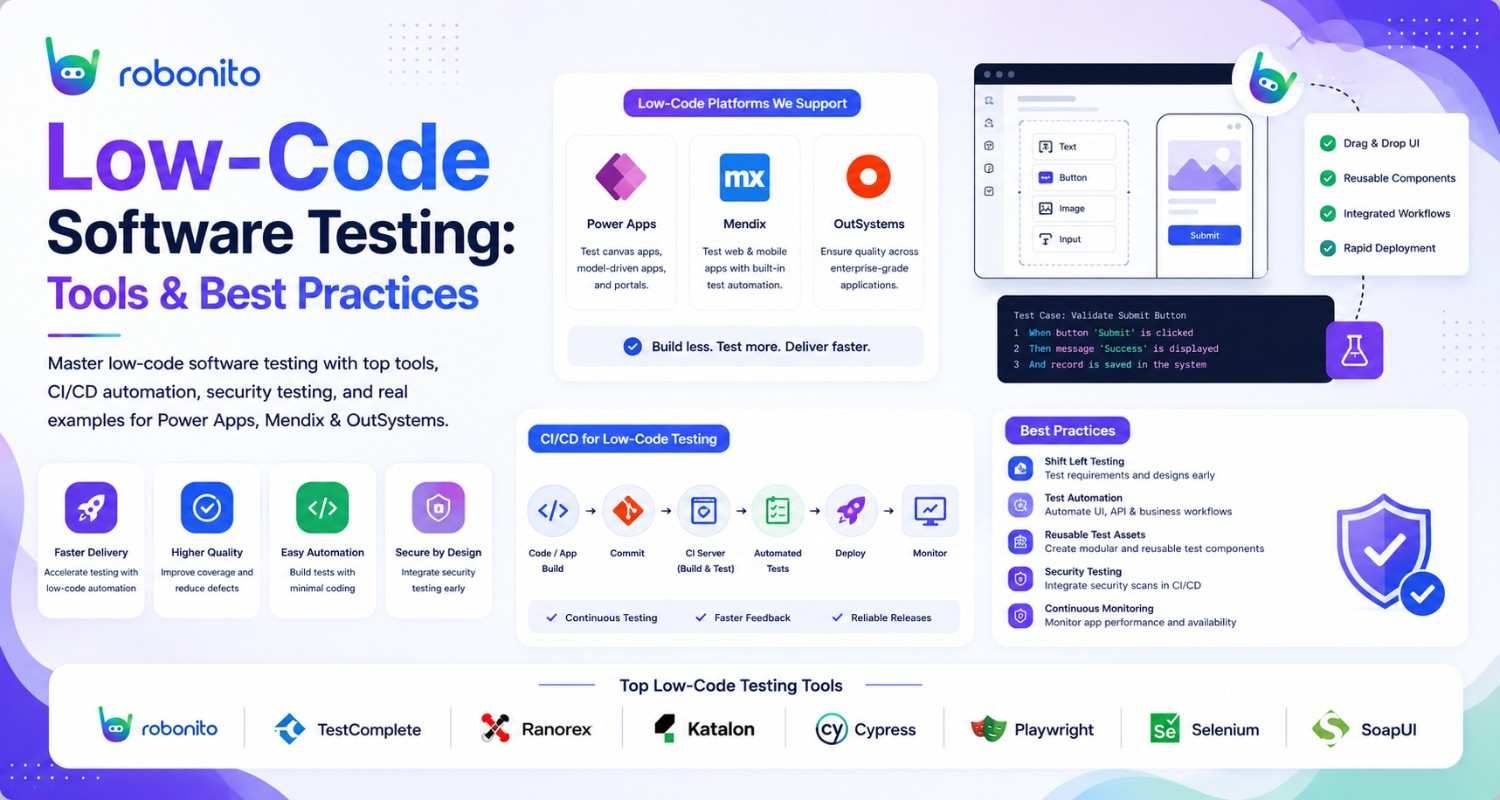
Low-code development platforms promise that anyone can build an application. What they do not advertise is that an application anyone can build still requires a testing strategy. Skipping rigorous testing of low-code apps is how teams discover that the platform update that deployed automatically last Tuesday broke the integration that processes all their customer orders.
By Robonito Engineering Team · Updated May 2026 · 18 min read
Quick stats
| Fact | Source |
|---|---|
| The low-code development market reaches $65 billion by 2027 | Gartner |
| 70% of new business applications will use low-code or no-code tools by 2025 | [Gartner]((https://www.gartner.com/en/information-technology/insights/low-code-development) |
| Low-code apps have 3× more integration dependencies than traditional apps on average | Forrester |
| Teams that skip regression testing for low-code apps report 2× more production incidents after platform updates | Capgemini World Quality Report 2025 |
| Automated testing reduces low-code application defect leakage by up to 68% | CISQ 2024 |
Table of Contents
- What is low-code software testing?
- Why testing low-code apps is different — and harder
- The five biggest challenges in low-code testing
- Types of testing every low-code application needs
- Platform-specific testing strategies
- Real test examples for low-code applications
- Automating low-code application testing
- Low-code testing tools compared
- Security testing for low-code applications
- CI/CD integration for low-code testing
- Pre-release low-code testing checklist
- Frequently Asked Questions
Test your low-code application without writing test scripts
Robonito auto-generates test cases from your real user flows, runs them after every platform update, and alerts you the moment a workflow breaks — no source code access required. Try Robonito free →
1. What is low-code software testing?
One-sentence definition for featured snippets: Low-code software testing is the process of validating applications built on low-code development platforms for functional correctness, integration reliability, security, and performance — using testing strategies adapted to the constraints of visual development environments.
Low-code development platforms — OutSystems, Mendix, Microsoft Power Apps, Appian, Salesforce Platform, ServiceNow, and others — allow teams to build applications primarily through visual configuration, drag-and-drop components, and pre-built modules rather than hand-written code.
This is a genuine productivity advantage. Applications that would take a traditional development team months to build can be delivered in weeks. Business users who are not professional developers can contribute to application construction. Iteration cycles are faster.
But "low-code" does not mean "low-risk." The applications built on these platforms serve real users, process real transactions, and integrate with real systems. When they fail — and without proper testing, they will — the consequences are identical to failures in traditionally-coded applications: lost data, broken workflows, security incidents, and damaged user trust.
The testing approach, however, is different. You cannot write unit tests for a drag-and-drop workflow the same way you write unit tests for a Python function. You cannot trace a bug to a specific line of code when the logic lives in visual configuration. The testing strategies that work for traditional applications need to be adapted — and in some areas, replaced entirely — for low-code environments.
Low-Code vs No-Code Testing: What's the Difference?
Many teams use the terms low-code and no-code interchangeably, but they create very different testing requirements.
Low-code platforms such as OutSystems, Mendix, Microsoft Power Apps, and Salesforce Platform allow developers and business users to build applications using visual tools while still supporting custom code, APIs, integrations, and advanced business logic. No-code platforms focus almost entirely on visual configuration and are designed primarily for non-technical users.
The distinction matters because testing complexity increases as application customization grows.
| Area | Low-Code Testing | No-Code Testing |
|---|---|---|
| Custom code support | Often supported | Rarely supported |
| API integrations | Common | Limited |
| Business logic complexity | High | Moderate |
| Performance testing needs | Higher | Lower |
| Security testing requirements | Extensive | Moderate |
| Automation options | UI, API, and platform-native testing | Mostly UI testing |
| Typical users | Developers + business teams | Business users |
For example, a Power Apps application connected to Microsoft Dynamics, Azure Functions, and external REST APIs requires integration testing, security validation, performance testing, and automated regression coverage.
A simple no-code workflow that routes form submissions into Google Sheets may only require functional testing and workflow validation.
The biggest mistake teams make is assuming that low-code applications require less testing because they contain less hand-written code. In reality, low-code applications often depend on more integrations, more configuration layers, and more platform-managed components than traditional applications.
Every integration, workflow, and platform update introduces potential failure points that must be tested before release.
Rule of thumb: Treat low-code applications like enterprise software and no-code applications like business workflows. Both require testing, but the depth, risk, and automation strategy are significantly different.
When to Choose Low-Code Testing
Low-code testing is the right approach when your application:
- Connects to multiple APIs or third-party systems
- Contains custom business rules and workflows
- Handles sensitive customer or financial data
- Requires performance and security validation
- Supports large user populations
- Must meet compliance requirements
As low-code adoption continues to grow, organizations increasingly treat low-code applications with the same testing rigor as traditionally developed software.
2. Why testing low-code apps is different — and harder
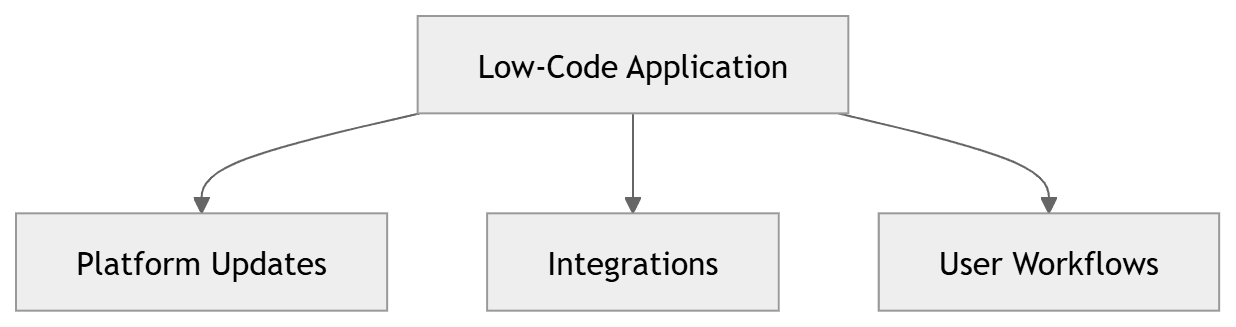
Three characteristics of low-code platforms make testing fundamentally different from traditional application testing.
Platform-managed updates create invisible regressions
Most low-code platforms push automatic updates to their runtime environment on a rolling basis. OutSystems, Power Apps, Mendix, and ServiceNow all update their underlying platform infrastructure regularly, often without requiring any action from the application team. These updates can change the behaviour of platform components — how a form renders, how an API connector handles errors, how an authentication module processes tokens — in ways that break your application without any change on your end.
In traditional development, the only things that change your application are commits to your codebase. In low-code development, the platform itself can change your application's behaviour without your knowledge. This makes continuous regression testing — testing after every platform update, not just after your own deployments — essential rather than optional.
Source code is unavailable or inaccessible
Traditional testing strategies assume access to source code for unit testing, static analysis, and code coverage measurement. In low-code platforms, the underlying code is either proprietary and inaccessible, or auto-generated in a form not suited to manual unit testing. This shifts the entire testing burden to functional, integration, and UI-level testing — the layers that do not require code access.
Integration complexity is higher
Low-code applications are almost always integration-heavy. The entire value proposition of low-code is assembling pre-built components — which often means connecting to external APIs, databases, authentication services, and data sources. Forrester research shows that low-code applications have on average three times more integration dependencies than traditionally-coded applications. Each integration is a potential failure point that requires explicit testing.
AI-Powered Testing for Low-Code Applications
Low-code platforms evolve constantly.
Platform updates modify user interfaces, integrations change response formats, and business teams frequently adjust workflows without following traditional development processes. These changes create a challenge for conventional test automation.
A test that worked perfectly last month may fail today because a platform update changed an element identifier, modified page structure, or introduced a new validation step.
This is where AI-powered testing becomes valuable.
Unlike traditional scripted automation, AI testing platforms use machine learning and behavior analysis to adapt to application changes automatically, reducing the maintenance burden associated with large regression suites.
Traditional Automation vs AI Testing
| Capability | Traditional Automation | AI-Powered Testing |
|---|---|---|
| Requires manual script creation | Yes | Often reduced |
| Handles UI changes automatically | No | Often yes |
| Self-healing test maintenance | Limited | Built-in |
| Natural language test creation | Rare | Common |
| Adapts to platform updates | Manual effort | Automated |
| Maintenance effort | High | Lower |
| Regression execution speed | Fast | Fast |
| Long-term maintenance cost | Higher | Lower |
For low-code applications, self-healing is particularly valuable.
Platforms such as Power Apps, OutSystems, Mendix, Salesforce, and Appian can modify generated HTML structures during upgrades. Traditional CSS selectors often break after these updates, forcing teams to spend time repairing test suites rather than validating business functionality.
AI-powered tools identify elements based on context, accessibility attributes, user behavior, visual relationships, and historical execution patterns instead of relying entirely on fragile selectors.
Where AI Testing Delivers the Most Value
AI-powered testing is especially effective for:
- High-frequency regression testing
- Large business workflows spanning multiple pages
- Applications with frequent UI changes
- Platform-managed updates
- Cross-browser validation
- Enterprise release cycles
- Citizen-developed applications
- Continuous deployment environments
For example, a customer onboarding workflow may involve:
- Account creation
- Identity verification
- CRM integration
- Approval workflow
- Email notifications
- Payment processing
An AI-powered testing platform can automatically validate the entire workflow after every deployment, configuration change, or platform update.
This helps teams identify issues before users experience broken workflows in production.
AI Does Not Replace Testing Strategy
One of the biggest misconceptions about AI testing is that it eliminates the need for test planning.
It does not.
Teams still need:
- Clear acceptance criteria
- Risk-based test planning
- Integration validation
- Security testing
- Performance testing
- Accessibility testing
- Human exploratory testing
AI reduces test maintenance effort and accelerates test creation, but it cannot determine which business processes are most critical to your organization.
The strongest low-code testing programs combine:
- AI-powered regression testing
- API automation
- Security validation
- Performance testing
- Platform-native testing
- Human exploratory testing
Together, these layers provide faster feedback, broader coverage, and greater confidence in production releases.
Why AI Testing Is Becoming Essential for Low-Code Platforms
As low-code applications become larger and more business-critical, manual testing and traditional scripted automation struggle to keep pace with platform updates and rapidly changing workflows.
AI-powered testing helps teams:
- Reduce maintenance effort
- Detect regressions faster
- Improve release confidence
- Scale QA without increasing headcount
- Support continuous delivery practices
For organizations building on OutSystems, Power Apps, Mendix, Salesforce, or Appian, AI-assisted testing is increasingly becoming a practical way to maintain quality while keeping up with the speed of low-code development.
3. The five biggest challenges in low-code testing
| Challenge | Why it happens | Impact if ignored |
|---|---|---|
| Limited code-level visibility | Platform abstracts business logic into visual config | Bugs are hard to isolate and diagnose |
| Automatic platform updates | Platform vendor deploys infrastructure changes | Silent regressions after platform releases |
| Integration dependency failures | Many external connections, each with its own failure modes | Data corruption, broken workflows |
| Replicating real-world edge cases | Visual builders make it easy to miss boundary conditions | Production failures on unusual but valid inputs |
| The "low-code = low-risk" fallacy | Teams assume the platform handles quality | Under-investment in testing, excessive production defects |
The fallacy that deserves special attention
The "low-code = low-risk" fallacy is the most dangerous testing pitfall in this space. The reasoning goes: "The platform vendor tested this — we just configured it, so it should work." This misunderstands what the platform vendor tested. They tested that their platform components work correctly in isolation. They did not test your specific configuration, your specific integrations, your specific data, or your specific user workflows. All of that is yours to test.
A misconfigured validation rule in Power Apps passes all of the platform's own tests. It will still accept data that violates your business rules. Only your tests catch that.
4. Types of testing every low-code application needs
4.1 Functional / workflow testing
Question it answers: Do all configured workflows produce the correct business outcomes?
Functional testing for low-code applications focuses on user-facing workflows — the complete sequences of actions that users perform to accomplish business tasks. A form submission workflow, an approval chain, a data export, a search and filter operation. Each workflow needs test cases covering the happy path, all documented error conditions, and boundary value inputs.
Because low-code logic lives in visual configuration rather than code, functional tests must be written at the UI or API level — you cannot write unit tests for a Power Automate flow the way you would unit test a JavaScript function.
4.2 Integration testing
Question it answers: Do all connections to external systems work correctly and handle failures gracefully?
Integration testing is the highest-priority testing investment for most low-code applications. Every connector, API call, database connection, and authentication flow is a potential failure point. Integration tests must cover:
- Successful data flow in both directions (read and write)
- Correct error handling when the external system is unavailable
- Data format and schema compatibility between systems
- Authentication and authorisation at integration boundaries
- Behaviour when the external API returns unexpected response schemas
4.3 Regression testing
Question it answers: Did the platform update that deployed last night break anything that was working before?
Regression testing for low-code applications must run after every platform update — not just after your own changes. Continuous automated regression testing is the primary defence against the silent regressions that platform updates introduce.
A regression suite for a low-code application should cover all critical user workflows. Every test in the regression suite should run automatically after every platform event (update, configuration change, connector upgrade) and alert the team immediately when a previously passing test fails.
4.4 Security testing
Question it answers: Can the application be exploited, and does it handle sensitive data correctly?
Low-code platforms provide built-in security features — authentication, role-based access control, encrypted data transmission — but built-in security is not the same as secure configuration. The most common security failures in low-code applications are not platform vulnerabilities — they are misconfigured access controls that allow users to see or modify data they should not, and unsanitised data passed to external systems that enables injection attacks.
See Section 9 for a full low-code security testing breakdown.
4.5 Performance testing
Question it answers: Does the application remain responsive under the traffic volumes your users actually generate?
Low-code platforms vary significantly in their performance characteristics. Most handle moderate traffic adequately but have specific bottlenecks — complex data queries, heavy visual processing, synchronous API call chains — that degrade under load. Performance testing identifies these bottlenecks before users encounter them.
Test at realistic concurrent user volumes, simulate peak usage scenarios, and verify that the application meets its performance SLAs (typically p95 page load < 3 seconds, p95 API response < 500ms).
4.6 Usability and accessibility testing
Question it answers: Can all users — including those with disabilities — accomplish their goals efficiently?
Low-code platforms generate their own HTML and CSS, which means accessibility compliance depends partly on the platform and partly on your configuration choices. Not all low-code platforms generate fully WCAG-compliant output by default. Automated accessibility scanning with axe-core, combined with keyboard navigation testing, verifies that your application is usable by everyone.
5. Platform-specific testing strategies
Different low-code platforms require different testing approaches based on their architecture and the testing tools they expose.
OutSystems
OutSystems provides a native BDD Framework module that enables Behaviour-Driven Development tests written directly within the OutSystems development environment. These tests use Gherkin-style Given-When-Then syntax and integrate with OutSystems' built-in testing infrastructure. This is the most OutSystems-native approach to automated testing and should be the primary testing tool for OutSystems teams.
For UI-level regression testing, Playwright works well against OutSystems applications — it interacts through the browser and does not require access to OutSystems' internal architecture. OutSystems Reactive Web and Mobile apps expose standard HTML, making them fully testable with any browser automation tool.
For API testing, OutSystems REST services are standard HTTP endpoints testable with Postman, pytest, or any REST testing framework.
Microsoft Power Apps
Power Apps presents unique testing challenges because Microsoft's official testing tool, Test Studio, is built directly into the Power Apps maker portal. Test Studio allows canvas app testing without leaving the Power Apps environment, using a record-and-replay approach that non-developers can use.
For model-driven Power Apps, Playwright-based UI testing is the most reliable approach. Power Apps components render as standard web elements (with some caveats around dynamic class names that require stable selector strategies — use data-testid attributes wherever Power Apps permits custom attributes).
Microsoft's Power Platform CLI enables running Power Apps tests in CI/CD pipelines:
## Power Platform CLI — run Test Studio tests in CI
pac test run \
  --test-suite-name "Customer Management Tests" \
  --environment-url "https://yourorg.crm.dynamics.com" \
  --output-directory ./test-results

## Check exit code — non-zero means test failures
echo "Exit code: $?"
Mendix
Mendix provides ATS (Application Test Suite) — an automated functional testing tool purpose-built for Mendix applications. ATS handles the Mendix-specific DOM structure that makes generic Playwright selectors challenging. For teams needing a Mendix-native testing solution, ATS is the recommended starting point.
Mendix applications can also be tested with Playwright for teams who need cross-platform test management or are testing Mendix alongside other application types. The key challenge is Mendix's dynamic class name generation — use ARIA roles and data attributes rather than CSS classes.
Salesforce Platform (formerly Force.com)
Salesforce provides Apex test classes for backend logic testing and Lightning Testing Service for Lightning component testing. For UI-level acceptance testing of Salesforce applications, Playwright with ARIA-based selectors is the most stable approach. See the Salesforce automated testing guide for a full breakdown.
6. Real test examples for low-code applications
6.1 Playwright functional test for a Power Apps form
// tests/power-apps/customer-form.spec.ts
import { test, expect } from '@playwright/test';

test.describe('Customer Management Form — Power Apps', () => {

  test.beforeEach(async ({ page }) => {
    // Authenticate with Power Apps
    await page.goto(process.env.POWER_APPS_URL!);
    await page.getByPlaceholder('Email or phone').fill(process.env.TEST_USER_EMAIL!);
    await page.getByRole('button', { name: 'Next' }).click();
    await page.getByPlaceholder('Password').fill(process.env.TEST_USER_PASSWORD!);
    await page.getByRole('button', { name: 'Sign in' }).click();
    await page.waitForURL('**/apps/**');
  });

  test('creates new customer record with all required fields', async ({ page }) => {
    // Navigate to customer creation form
    await page.getByRole('button', { name: 'New Customer' }).click();

    // Fill required fields using accessible selectors
    await page.getByLabel('Company name').fill('Acme Corporation');
    await page.getByLabel('Primary contact').fill('Jane Smith');
    await page.getByLabel('Email').fill('jane.smith@acme.com');
    await page.getByLabel('Phone').fill('+1-555-0100');

    // Select from dropdown
    await page.getByLabel('Industry').selectOption('Technology');
    await page.getByLabel('Account tier').selectOption('Enterprise');

    // Save the record
    await page.getByRole('button', { name: 'Save' }).click();

    // Verify success — record appears in the list
    await expect(page.getByText('Record saved successfully')).toBeVisible();
    await expect(page.getByText('Acme Corporation')).toBeVisible({ timeout: 10000 });
  });

  test('shows validation errors when required fields are empty', async ({ page }) => {
    await page.getByRole('button', { name: 'New Customer' }).click();

    // Submit without filling required fields
    await page.getByRole('button', { name: 'Save' }).click();

    // Verify validation messages appear
    await expect(page.getByText('Company name is required')).toBeVisible();
    await expect(page.getByText('Email is required')).toBeVisible();

    // Verify page did not navigate away
    await expect(page.getByRole('heading', { name: 'New Customer' })).toBeVisible();
  });

  test('rejects duplicate email addresses', async ({ page }) => {
    // This customer already exists in the test environment
    await page.getByRole('button', { name: 'New Customer' }).click();
    await page.getByLabel('Company name').fill('Another Company');
    await page.getByLabel('Email').fill('existing@customer.com');
    await page.getByRole('button', { name: 'Save' }).click();

    await expect(page.getByText('A customer with this email already exists'))
      .toBeVisible();
  });
});
6.2 Integration test — verifying a Power Automate flow via API
## tests/integration/test_power_automate_flow.py
import pytest
import httpx
import time

## Test the order notification flow:
## Power Apps form submission → Power Automate → external CRM → email notification

BASE_URL = "https://yourorg.api.powerplatform.com"
FLOW_TRIGGER_URL = "https://prod-XX.westus.logic.azure.com/workflows/..."

class TestOrderNotificationFlow:

    def test_order_submission_triggers_crm_update(
        self, auth_headers, test_crm_client, cleanup_test_data
    ):
        """
        Integration AC: When an order is submitted via Power Apps,
        the CRM should reflect the new order within 30 seconds.
        """
        order_payload = {
            "customerId": "test-customer-001",
            "productId": "WIDGET-PRO-001",
            "quantity": 5,
            "totalAmount": 249.95,
            "testRun": True  ## Flag to avoid sending real emails
        }

        ## Trigger the Power Automate flow via HTTP trigger
        res = httpx.post(FLOW_TRIGGER_URL, json=order_payload, headers=auth_headers)
        assert res.status_code == 202, f"Flow trigger failed: {res.text}"

        ## Power Automate flows are asynchronous — poll for completion
        max_wait_seconds = 30
        crm_order = None

        for attempt in range(max_wait_seconds):
            crm_order = test_crm_client.get_order_by_reference(
                f"test-customer-001-WIDGET-PRO-001"
            )
            if crm_order:
                break
            time.sleep(1)

        ## Verify the CRM was updated correctly
        assert crm_order is not None, \
            f"CRM order not found after {max_wait_seconds} seconds"
        assert crm_order["quantity"] == 5
        assert crm_order["status"] == "pending"
        assert crm_order["total_amount"] == 249.95

    def test_flow_handles_unavailable_crm_gracefully(
        self, auth_headers, mock_crm_unavailable
    ):
        """
        Integration AC: When the CRM is unavailable, the flow should
        queue the update and retry — not silently discard the order.
        """
        order_payload = {
            "customerId": "test-customer-002",
            "quantity": 1,
            "totalAmount": 49.99,
            "testRun": True
        }

        res = httpx.post(FLOW_TRIGGER_URL, json=order_payload, headers=auth_headers)

        ## Flow should still accept the trigger (202) and queue for retry
        assert res.status_code == 202

        ## Verify the order was queued — not discarded
        queued_orders = test_crm_client.get_queued_orders()
        order_ids = [o["customer_id"] for o in queued_orders]
        assert "test-customer-002" in order_ids
6.3 OutSystems BDD test (Gherkin format)
## OutSystems BDD Framework test
## Location: OutSystems/UserManagement/BDDTests/UserCreation.feature

Feature: User Account Creation
  As an administrator
  I want to create user accounts
  So that new employees can access the system

  Scenario: Create user with valid details
    Given I am logged in as an administrator
    When I navigate to "User Management" > "Create New User"
    And I fill in "Username" with "john.doe"
    And I fill in "Email" with "john.doe@company.com"
    And I select "Role" as "Standard User"
    And I click "Create Account"
    Then I should see "User created successfully"
    And the user "john.doe" should appear in the users list
    And an activation email should be sent to "john.doe@company.com"

  Scenario: Block duplicate username creation
    Given I am logged in as an administrator
    And a user with username "existing.user" already exists
    When I attempt to create a new user with username "existing.user"
    And I click "Create Account"
    Then I should see "Username already taken"
    And no new user record should be created
7. Automating low-code application testing
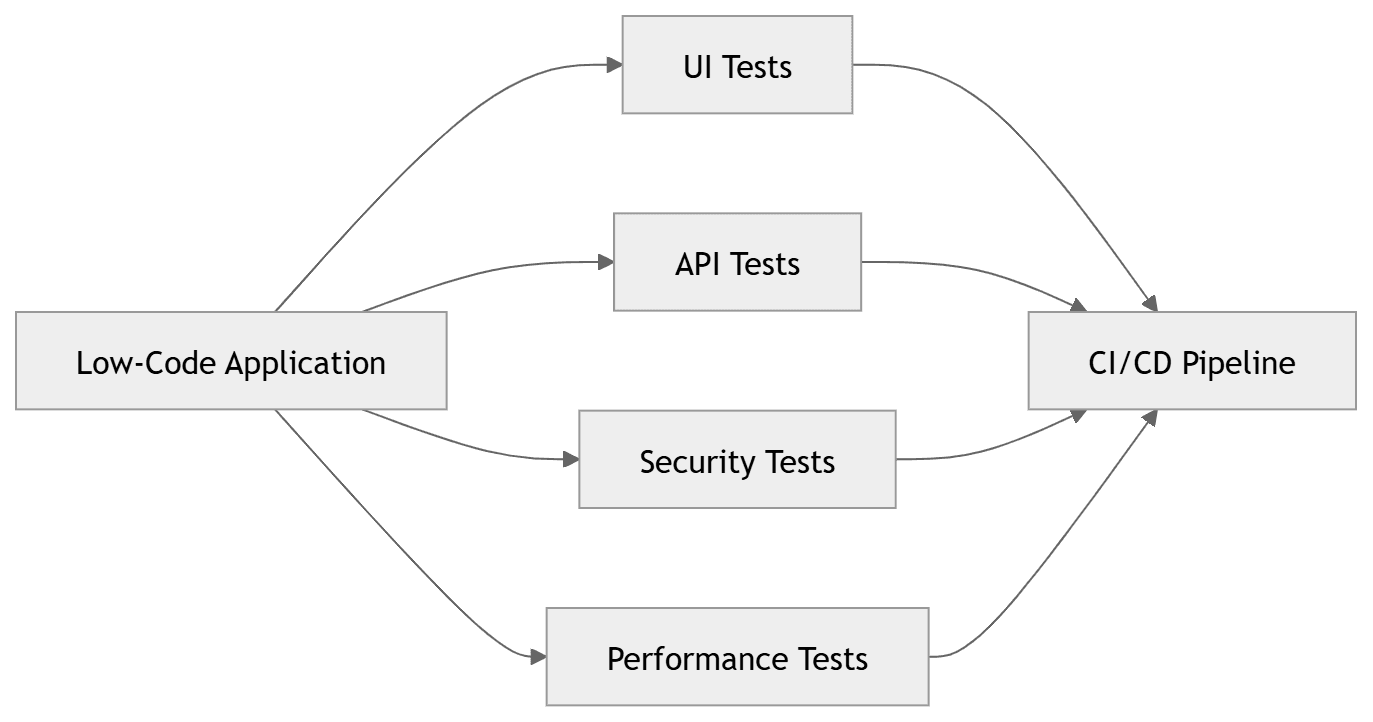
Automation is not optional for low-code testing — it is the only way to keep pace with the continuous change that low-code platforms introduce. Platform updates happen on the vendor's schedule, not yours. Without automated regression coverage, every platform update is a risk event.
The automation strategy for low-code environments
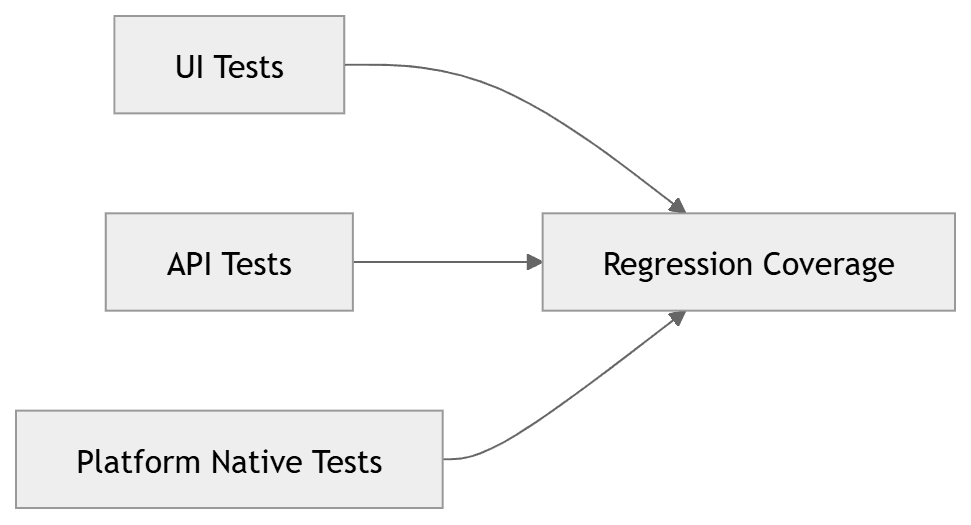
Layer 1 — UI automation (Playwright, Cypress, Robonito): Tests run through the browser, completely independent of the underlying platform. They do not care whether the application is built on OutSystems, Power Apps, or Mendix — they interact with HTML elements and verify HTML outcomes. This is the most portable and widely applicable layer.
Layer 2 — API automation (Postman, pytest, REST Assured): Tests call the application's API endpoints directly. For low-code applications that expose REST services (OutSystems REST APIs, Power Apps custom connectors), API testing provides faster, more reliable coverage than UI testing for backend logic.
Layer 3 — Platform-native automation (OutSystems BDD, Power Apps Test Studio, Mendix ATS): Tests built using the platform's own testing tools. Tightly integrated with the platform, but less portable and sometimes more brittle when platform updates change the testing infrastructure itself.
Recommended approach: Start with Layer 1 (UI automation) for critical user workflows, add Layer 2 (API automation) for integration points, and use Layer 3 (platform-native) selectively for complex scenarios that Layer 1 and Layer 2 cannot cover cleanly.
Why Robonito is particularly effective for low-code testing
Traditional scripted automation tools require access to the application's source code or architecture to write stable selectors. Low-code platforms often generate dynamic CSS class names that change between updates, making CSS selector-based tests extremely brittle.
Robonito's AI-powered test generation works at the user interaction level — observing how users actually interact with the application and generating tests from those interactions. Self-healing adapts automatically when the platform changes element structure. This makes Robonito particularly well-matched to low-code environments where the underlying markup changes regularly without warning.
8. Low-code testing tools compared
| Tool | Platform support | Code required | Platform-native | Best for |
|---|---|---|---|---|
| Playwright | All web-based | Yes (TS/Python/Java) | No | Cross-platform UI regression |
| Cypress | All web-based | Yes (JavaScript) | No | Frontend acceptance tests |
| Robonito | All web-based | None | No | No-code regression, auto-healing |
| OutSystems BDD | OutSystems only | Low (Gherkin) | ✅ Yes | OutSystems-native BDD tests |
| Power Apps Test Studio | Power Apps only | None | ✅ Yes | Canvas app testing |
| Mendix ATS | Mendix only | Low | ✅ Yes | Mendix-native functional tests |
| Postman | All API-based | Low (GUI) | No | API integration testing |
| k6 | All HTTP-based | Yes (JavaScript) | No | Performance testing |
| OWASP ZAP | All web-based | Low (CLI) | No | Security scanning |
Which combination works best
OutSystems teams: OutSystems BDD Framework for business logic tests, Playwright for UI regression, pytest for API testing.
Power Apps teams: Power Apps Test Studio for canvas apps, Playwright for model-driven apps, Power Platform CLI for CI integration.
Mendix teams: Mendix ATS for functional tests, Playwright for cross-browser UI regression, JMeter or k6 for performance.
Multi-platform or mixed-technology teams: Playwright + Robonito for UI testing (works across all web-based platforms), Postman or pytest for API testing, k6 for performance.
9. Security testing for low-code applications
Low-code platforms provide built-in security infrastructure — identity management, role-based access control, encrypted data in transit — but they cannot protect against misconfigured access rules, overly permissive data sharing, or injection vulnerabilities in custom code and connectors. Security testing for low-code applications must cover all of these.
Access control verification
Every data entity in your low-code application should have explicit tests verifying that users can only access data they are authorised to access.
## tests/security/test_access_controls.py

class TestLowCodeAccessControls:

    def test_standard_user_cannot_access_admin_records(
        self, standard_user_client, admin_only_record_id
    ):
        """
        Security AC: Standard users must not access records
        restricted to administrator roles.
        """
        res = standard_user_client.get(f"/api/data/v1/restricted-records/{admin_only_record_id}")

        ## Must return 403 Forbidden — not 200 with the data
        assert res.status_code == 403

        ## Verify the response does not leak the record's data
        response_body = res.json()
        assert "name" not in response_body
        assert "data" not in response_body

    def test_user_a_cannot_read_user_b_data(
        self, user_a_client, user_b_customer_id
    ):
        """
        Security AC: Users must only access their own customer records.
        IDOR (Insecure Direct Object Reference) prevention test.
        """
        res = user_a_client.get(f"/api/data/v1/customers/{user_b_customer_id}")
        assert res.status_code in [403, 404]

    def test_sensitive_fields_excluded_from_api_responses(self, auth_client):
        """
        Security AC: Password fields, internal IDs, and PII beyond
        what is necessary must not appear in API responses.
        """
        res = auth_client.get("/api/data/v1/users/current")
        assert res.status_code == 200

        user_data = res.json()
        assert "password" not in user_data
        assert "passwordHash" not in user_data
        assert "internalSecurityToken" not in user_data
Custom connector security testing
Low-code applications frequently use custom connectors to integrate with external services. These connectors are a common source of security vulnerabilities because they handle credentials, pass user data to external systems, and often have less rigorous review than platform-native components.
Test every custom connector for:
- Credentials stored correctly (never in plain text in connector configuration)
- User data not logged or exposed in error messages
- Input data sanitised before being passed to external systems
- Connector response data validated before being stored or displayed

10. CI/CD integration for low-code testing
Low-code testing must run in CI/CD pipelines to provide continuous protection against regressions from both your own changes and platform updates. The key difference from traditional CI/CD is that platform updates arrive on the vendor's schedule — which means your pipeline must trigger not only on code commits but also on platform update events.
## .github/workflows/low-code-testing.yml
name: Low-Code Application Tests

on:
  push:
    branches: [main, develop]
  pull_request:
  ## Also run nightly to catch platform update regressions
  schedule:
    - cron: '0 6 * * *'  # 6am UTC daily

jobs:
  ui-regression:
    name: UI Regression Tests (Playwright)
    runs-on: ubuntu-latest
    timeout-minutes: 20
    steps:
      - uses: actions/checkout@v4
      - uses: actions/setup-node@v4
        with: { node-version: '20', cache: 'npm' }
      - run: npm ci
      - run: npx playwright install --with-deps chromium webkit
      - name: Run UI regression tests against staging
        run: npx playwright test tests/
        env:
          APP_URL: ${{ secrets.STAGING_APP_URL }}
          TEST_USER_EMAIL: ${{ secrets.TEST_USER_EMAIL }}
          TEST_USER_PASSWORD: ${{ secrets.TEST_USER_PASSWORD }}
      - uses: actions/upload-artifact@v4
        if: failure()
        with:
          name: playwright-report
          path: playwright-report/

  api-integration:
    name: API Integration Tests (pytest)
    runs-on: ubuntu-latest
    steps:
      - uses: actions/checkout@v4
      - uses: actions/setup-python@v5
        with: { python-version: '3.12' }
      - run: pip install -r requirements-test.txt --break-system-packages
      - run: pytest tests/integration/ -v --tb=short
        env:
          API_BASE_URL: ${{ secrets.STAGING_API_URL }}
          TEST_TOKEN: ${{ secrets.TEST_API_TOKEN }}

  security-scan:
    name: Security Scan (OWASP ZAP)
    runs-on: ubuntu-latest
    if: github.ref == 'refs/heads/main'
    steps:
      - uses: actions/checkout@v4
      - uses: zaproxy/action-full-scan@v0.10.0
        with:
          target: ${{ secrets.STAGING_APP_URL }}
          fail_action: true

  no-code-regression:
    name: No-Code Regression (Robonito)
    runs-on: ubuntu-latest
    needs: [ui-regression, api-integration]
    steps:
      - uses: actions/checkout@v4
      - name: Run Robonito regression suite
        uses: robonito/run-tests-action@v2
        with:
          api-key: ${{ secrets.ROBONITO_API_KEY }}
          suite: low-code-regression
          environment: staging
          fail-on: critical
          notify-slack: ${{ secrets.SLACK_QA_WEBHOOK }}

  ## Nightly-only: full platform update regression check
  platform-update-regression:
    name: Platform Update Regression Check
    runs-on: ubuntu-latest
    if: github.event_name == 'schedule'
    steps:
      - uses: actions/checkout@v4
      - uses: actions/setup-node@v4
        with: { node-version: '20', cache: 'npm' }
      - run: npm ci
      - run: npx playwright install --with-deps
      - name: Full regression suite — all browsers
        run: npx playwright test tests/ --project=chromium --project=webkit --project=firefox
        env:
          APP_URL: ${{ secrets.STAGING_APP_URL }}
          TEST_USER_EMAIL: ${{ secrets.TEST_USER_EMAIL }}
          TEST_USER_PASSWORD: ${{ secrets.TEST_USER_PASSWORD }}
11. Pre-release low-code testing checklist
Use this before every production deployment and after every significant platform update.
Functional testing
- All critical user workflows tested end-to-end in the staging environment
- Happy path verified for every form, data entry, and process flow
- Error states verified — all validation messages display correctly
- Business rules enforced — required fields, data format constraints, value ranges
- Conditional logic tested — all branching paths exercise correctly
- Role-specific workflows tested for each user role that exists in the application
Integration testing
- All external API connectors tested with valid credentials in staging
- Integration error handling tested — what happens when the external API is unavailable
- Data mapping verified — fields flow correctly between systems in both directions
- Webhook and trigger testing — events fire correctly and payloads are correct
- Authentication flows tested for all integrated systems
Regression testing
- Full automated regression suite passing in CI
- Platform version number recorded in test run log
- Any tests that were failing before this release are verified fixed
- New test cases added for any defects fixed in this release
Security testing
- OWASP ZAP scan passes with no critical or high findings
- Access control tests pass — each role can access only authorised data
- IDOR tests pass — users cannot access other users' records by ID manipulation
- Custom connectors reviewed — credentials stored securely, not in plain text
- Sensitive fields absent from API responses (passwords, internal tokens, excess PII)
Performance testing
- p95 page load time < 3 seconds under expected concurrent users
- Integration response times within SLA under load
- No timeout errors in integrations under normal load
- Memory usage stable after 30-minute soak test
Accessibility
- axe-core scan passes: zero WCAG 2.2 AA violations
- All forms accessible by keyboard navigation
- All interactive elements have descriptive accessible names
Frequently Asked Questions
What is low-code software testing?
Low-code software testing is the validation of applications built on low-code platforms (OutSystems, Power Apps, Mendix, Appian) for functional correctness, integration reliability, security, and performance. It requires adapted strategies because low-code platforms abstract source code away, making traditional unit testing impractical.
Why is testing low-code applications different from traditional testing?
You cannot write unit tests for visual configurations the way you write unit tests for functions. Business logic lives in drag-and-drop workflows rather than code. Platform vendors push automatic updates that can change behaviour without any action on your part. Integration dependencies are more numerous. All of these make UI-level, integration-level, and continuous regression testing more critical than in traditional development.
What are the biggest challenges in low-code testing?
Limited code visibility, automatic platform updates creating silent regressions, heavy integration dependency, difficulty replicating edge cases, and the "low-code = low-risk" fallacy that leads teams to under-invest in testing.
Can low-code application testing be automated?
Yes. Playwright and Robonito work through the browser regardless of the underlying platform. API testing with pytest or Postman covers integration endpoints. Platform-native tools (OutSystems BDD, Power Apps Test Studio, Mendix ATS) provide deeper integration. Robonito's no-code approach is particularly effective because it does not require source code access and self-heals when platform updates change element structure.
How often should I run regression tests for a low-code application?
At minimum: after every change you deploy. Ideally: also on a nightly schedule to catch regressions introduced by platform updates that happened overnight. Low-code platforms update on their own schedule — a regression introduced by a Tuesday night platform update should be caught Wednesday morning, not Friday when users complain.
What is the best testing strategy for Microsoft Power Apps?
Use Power Apps Test Studio for canvas app functional tests (it requires no code and integrates directly with the maker portal). Use Playwright for model-driven Power Apps UI testing. Use the Power Platform CLI to run tests in GitHub Actions or Azure DevOps pipelines. Add Robonito for no-code regression testing that runs automatically after Power Apps platform updates.
Your low-code app changes every time the platform updates — your tests should keep up automatically
Robonito self-heals your test suite when Power Apps, OutSystems, or Mendix platform updates change element structure — zero manual test maintenance required after every vendor release. Start free at Robonito.com →
Automate your QA — no code required
Stop writing test scripts.
Start shipping with confidence.
Join thousands of QA teams using Robonito to automate testing in minutes — not months.